Family of Client IDs - Microsoft’s Pivot Playground (Part 1)
A practical guide to FOCI-driven token reuse, focusing on token types and storage locations across selected Microsoft applications.
⚠️ In late January 2026, Microsoft introduced a change impacting refresh token negotiation for Azure CLI and Azure PowerShell. Refresh tokens issued to these clients can no longer be reused, which suggests their removal from the FOCI list.
This article is for educational and defensive purposes only.
Use demonstrated techniques only in environments you are authorized to test.
This article is part of a two-part series exploring FOCI — a Pandora’s box of security risks opened by researchers at SecureWorks — which refers to a group of refresh tokens that can be used to forge access tokens for any application within the same Family of Client IDs.
Part 1 focuses on the foundations: a high-level look at Azure Entra ID security tokens (ID, access, and refresh tokens) and where these tokens are stored across common Microsoft application types (CLI tools, PowerShell, desktop apps, and mobile clients), with concrete extraction examples - Examples are illustrative, not exhaustive.
Part 2 builds on this groundwork to demonstrate how a refresh token can be abused to obtain access tokens for other FOCI-enabled applications, explores realistic threat actor scenarios, and discusses defensive mitigations.
Broker-managed tokens are intentionally out of scope, as they are OS-protected, device-bound, and generally accessible only with system or root privileges.
TL;DR:
FOCIlets some Microsoft client IDs reuse refresh tokens. This first part explains token fundamentals and storage locations. The second part will show how this behavior can be abused — and how to mitigate the risk.
📎 Series note
This article is Part 1 of a two-part series on FOCI.
→ Continue with Part 2: Abuse paths and mitigations
101 Security Tokens
Let’s start from the beginning - Microsoft Identity relies on these types of security tokens:
- Identity Token -
"credential_type":"IdToken"- A proof of authentication. A JWT token containing user information used in some OpenID Connect flows. - Access Token -
"credential_type":"AccessToken"- A JWT token confirming the right to access the resource. The access token provides temporary access (between 60 and 90 minutes) to the resource server for which it is scoped. The token’s lifetime may be configurable for applications and some service principals. Refresh Token -
"credential_type":"RefreshToken"- An opaque token that cannot be decoded, unlike JWT. This token starts with 0.A or 1.A and enables the forging of new security tokens.📝 Note: Unlike access tokens, the lifetime of a refresh token is no longer customizable. These tokens do not contain an expiration timestamp. Instead, Entra ID has a sliding inactivity window for refresh tokens with a maximum inactivity period of 24 hours for SPA or 90 days for other applications. Each successful use of the refresh token resets this inactivity window, allowing these tokens to persist indefinitely unless a security or policy event invalidates them (e.g. CA policy, session revocation…).
Primary Refresh Token - The strongest type of token. It’s an opaque token, device-bound and used to silently obtain refresh and access tokens for Microsoft applications.
📝 Note: Contrary to the first three tokens, the Primary Refresh Token (PRT) is not an OAuth token and is not issued via MSAL.
➡️ Refresh tokens are a prime target for maintaining persistence through a valid Entra ID account. And it gets even more serious with a refresh token from the Family of Client IDs (FOCI), as it can be used to generate security tokens for other applications, effectively enabling lateral movement across any other service in the FOCI list. But where can these tokens be found?
DPAPI Decryption - Token Extraction
During the exploration and hunt for tokens, proper equipment is needed to decrypt and format the various files and caches that we will encounter.
Windows mostly uses DPAPI - Data Protection API, a built-in component that enables the storage of sensitive data using a master key derived from the user’s Windows credentials. As a result, decrypting DPAPI-protected data requires access to the user’s machine or an active session.
For this article, token extraction is performed exclusively using Mimikatz, which include DPAPI decryption commands:
dpapi::blob /in:".\.Azure\msal_token_cache.bin" /unprotect
dpapi::blob /in:"$env:APPDATA\Local\.IdentityService\msal.cache.cae" /unprotect
This will return binary data in hex format, that must be converted to plaintext:
1
($binary_token_data -replace '\s','' -split '(..)' | ? {$_} | foreach($_){[char][byte]("0x$_")}) -join ''
Fantastical Tokens and Where to Find Them
📝 Note: This article focuses on user-interactive authentication. In these flows, tokens may be cached by MSAL or an OS-level broker. Non-interactive flows (e.g., service principals or managed identities) behave differently, and token persistence may vary depending on the client and environment; they are outside the scope of this analysis.
Now that we have the proper tools to investigate, let’s explore the various files:
Automation & CLI Tools
Azure CLI- On Non-Windows systems: After authenticating with az login, a file is created in the user’s home directory
%USERPROFILE%/.azure/msal_token_cache.jsoncontaining identity, access and refresh tokens in clear text. - On Windows: Since the migration from ADAL to MSAL starting from version 2.30, the tokens are stored in
%USERPROFILE%/.azure/msal_token_cache.bin. This file that is encrypted with DPAPI - as mentioned previously, the file can still be decrypted to retrieve the tokens in clear text.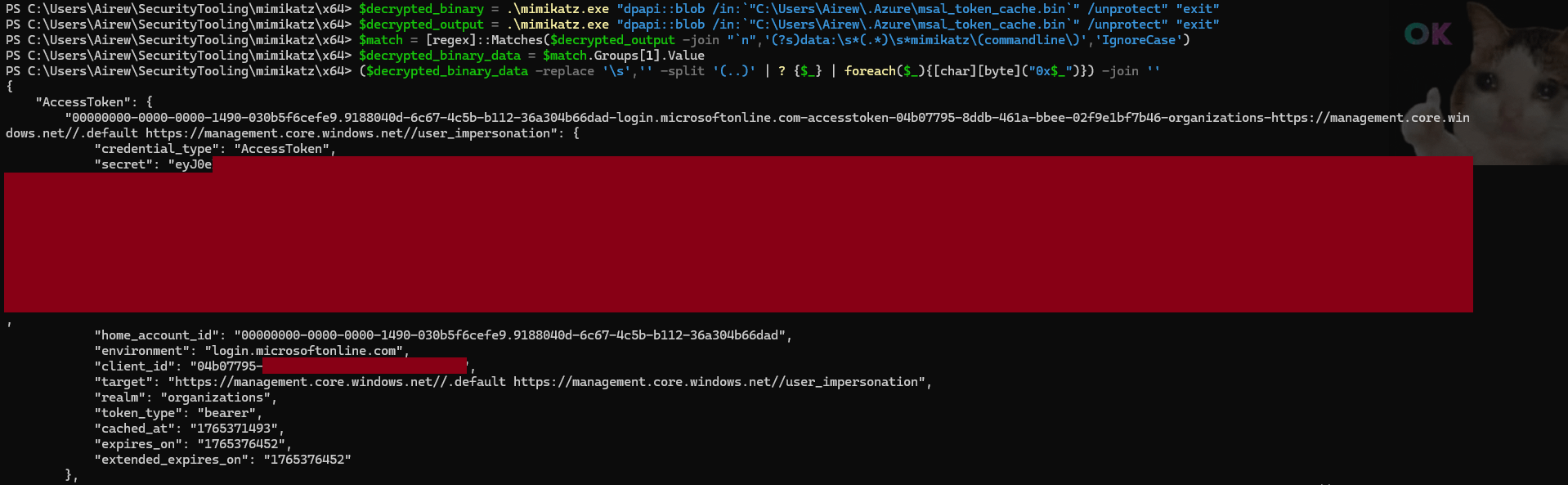
Client ID:
04b07795-8ddb-461a-bbee-02f9e1bf7b46
FOCI: ✅ In FOCI- On Non-Windows systems: After authenticating with az login, a file is created in the user’s home directory
Azure PowerShell- On older versions, clear-text tokens were stored under
%USERPROFILE%/.Azure/TokensCache.dat. For recent versions of Azure PowerShell, as indicated by the%USERPROFILE%/.Azure/AzureRmContext.json, the tokens are stored in%USERPROFILE%\AppData\Local\.IdentityService\msal.cache.caeormsal.cache.nocaedepending on the continuous access evaluation configuration. Both msal.cache.* files are encrypted with DPAPI.
 📝 Note: Previously the file used was msal.cache before continuous access evaluation was rolled out.
⚠️ Attention: Aside from DPAPI, tokens can be extracted with the command
Save-AzContext -Path ~/.Azure/azure_context.json…Client ID:
1950a258-227b-4e31-a9cf-717495945fc2
FOCI: ✅ In FOCI- On older versions, clear-text tokens were stored under
Microsoft Graph PowerShell- While exploring the files under
%USERPROFILE%\AppData\Local\.IdentityServicewe find two files:mg.msal.cache.cae&mg.msal.cache.nocaethat are encrypted with DPAPI. Upon decryption, I was able to confirm that both files save all three security tokens forged for Microsoft Graph PowerShell. Decoding the access token, we read the following information, confirming our assumption:
"aud": “00000003-0000-0000-c000-000000000000”"app_displayname": “Microsoft Graph Command Line Tools”"appid": “14d82eec-204b-4c2f-b7e8-296a70dab67e”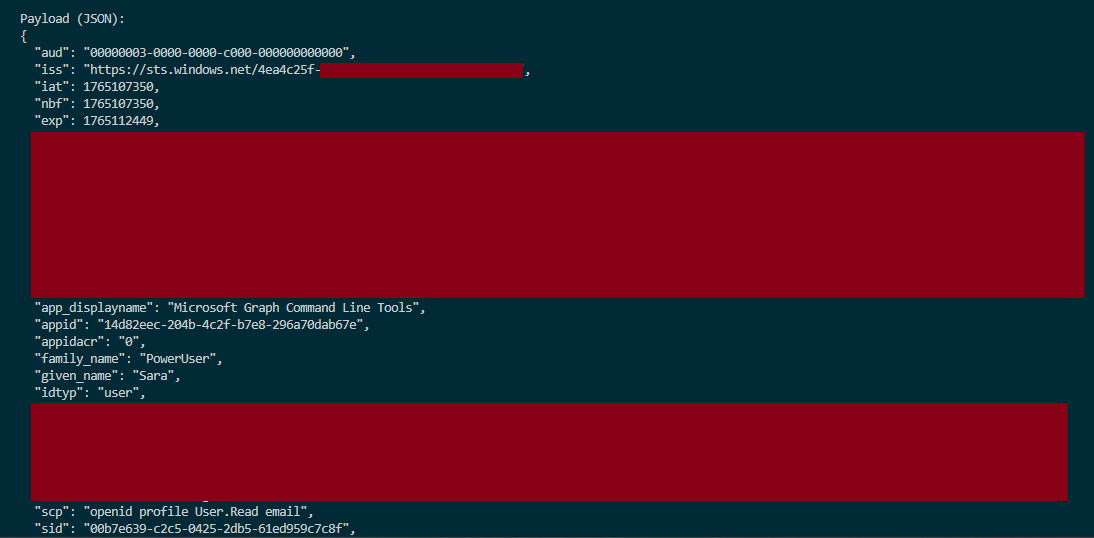
Client ID:
14d82eec-204b-4c2f-b7e8-296a70dab67e
FOCI: ❌ Not in FOCI
- While exploring the files under
Cloud Shell- Cloud Shell launched from the Azure Portal, shell.azure.com, or any Microsoft documentation page that embeds a Cloud Shell panel (“Try It”), inherits the user’s browser session tokens. No tokens are stored in the Cloud Shell associated storage account.
Microsoft 365 Applications (Desktop)
Teams Desktop- Tokens were previously stored as plain text in a SQLite database. Now stored under:
%USERPROFILE%\AppData\Local\Packages\MSTeams_8wekyb3d8bbwe\LocalCache\Microsoft\MSTeams\EBWebView\WV2Profile_tfl\Network\CookiesThese tokens are not encrypted with DPAPI but with Chromium, as indicated by the first hex binary characters in the encrypted_values :76 31 30 -> v10. Chromium decryption is out of scope for this article. As demonstrated by RandoriSec, the tokens can indeed be extracted after decrypting the blob.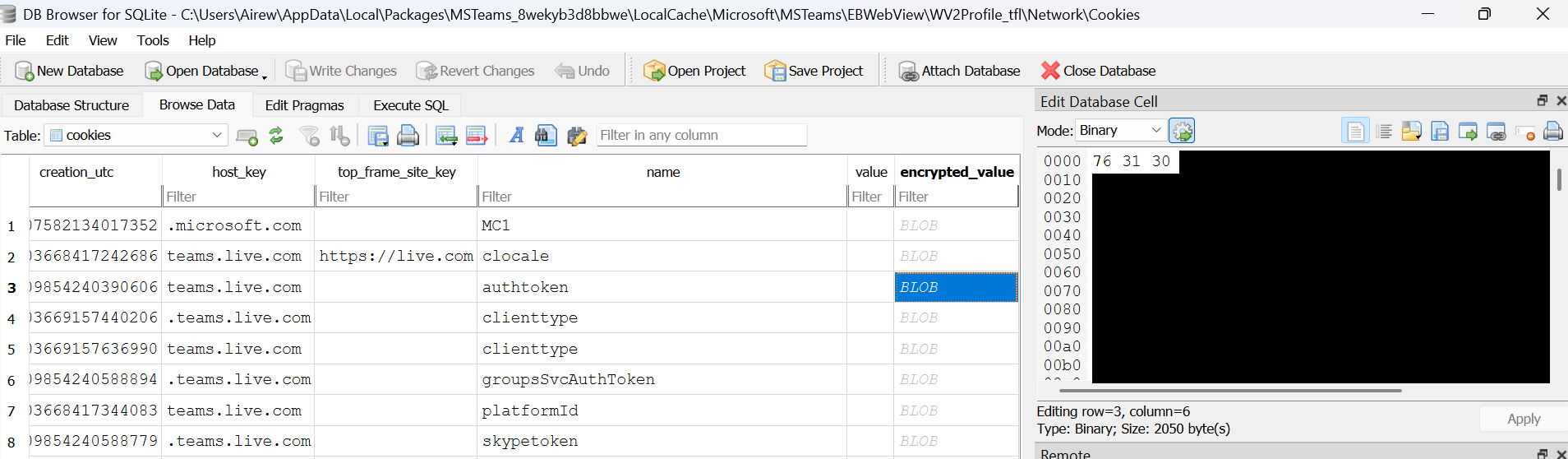
Teams tokens can be stored under WV2Profile_tfl or WV2Profile_tfw.
- Tokens were previously stored as plain text in a SQLite database. Now stored under:
Word, Excel, OutlookThe path
%USERPROFILE%\AppData\Local\Microsoft\TokenBroker\Cachelists multiple .TBRES files. These files are JSON-formatted and include encrypted values (evidenced by the flag “IsProtected”:true).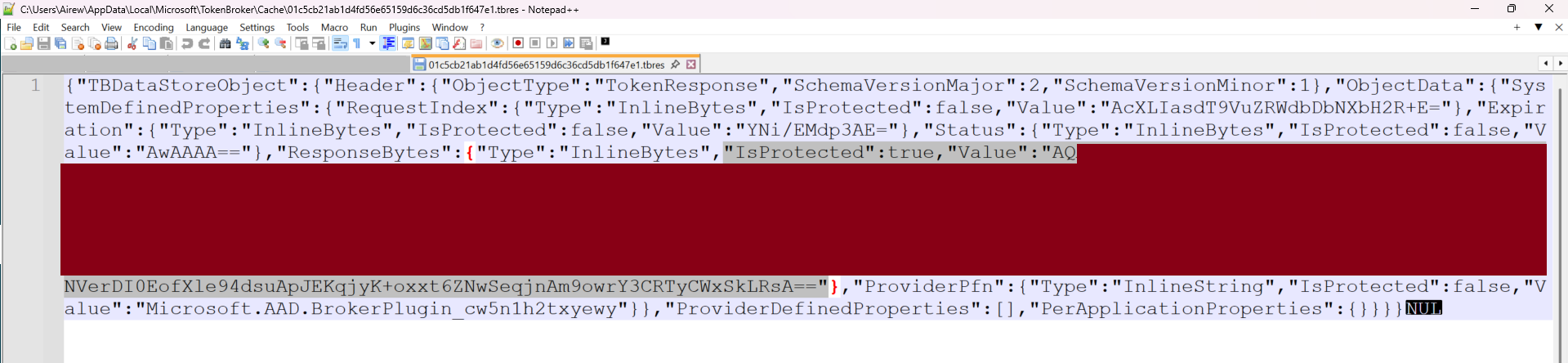 When decrypted for analysis, the payloads do not resemble a traditional token cache, instead, they appear to be serialized authentication responses produced by MSAL. These responses may include token materials embedded within the response objects as demonstrated below:
 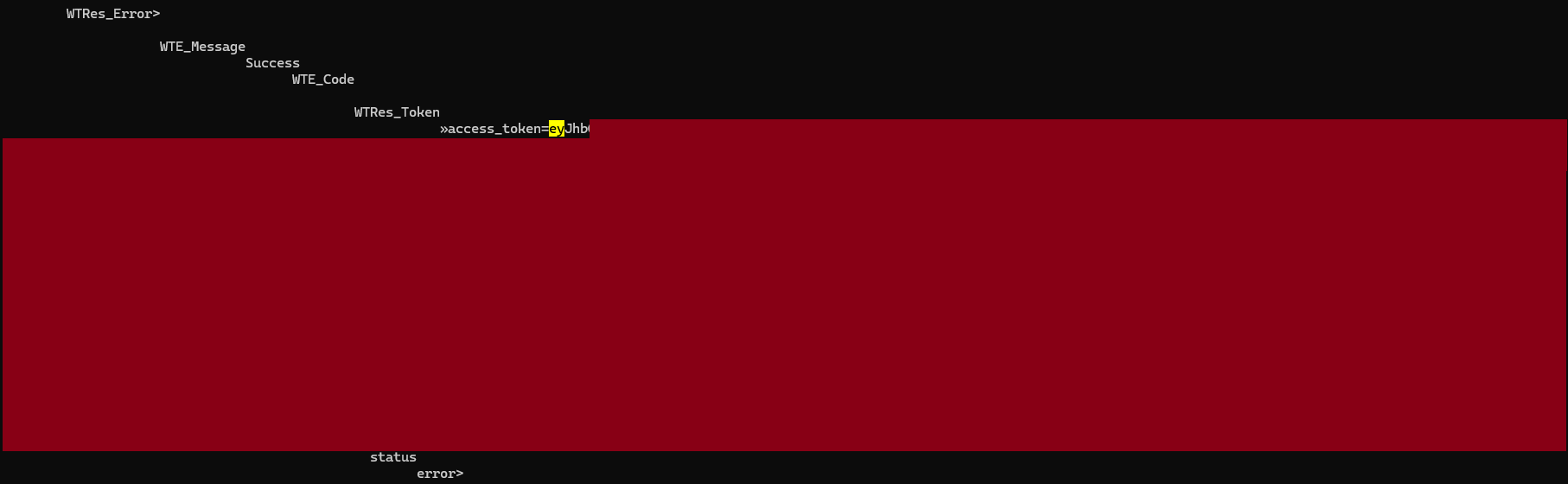 This result is returned by using a loop on all the TBRES files to retrieve the protected values then decrypt them using mimikatz until we retrieve a valid access token.
A PowerShell helper to extract and decrypt .tbres DPAPI blobs is available here — use only on systems you own or have explicit authorization to test.
Unlike the automation and CLI tools explored previously, Microsoft 365 desktop applications rely on the Windows authentication broker - WAM (Web Account Manager), to securely manage and broker the security tokens on behalf of the application.
Under WAM, long-lived credentials such as RT and PRT are protected by OS-level security boundaries and are not persisted as application-readable artifacts, making refresh token theft infeasible without full device compromise (e.g., administrative access combined with bypass of OS security protections).
In the event of system-level access, refresh tokens could potentially be abused to mint new access tokens and pivot to other applications that are part of the FOCI or the Microsoft trust chain demonstrated later in this article.
Client IDs:
1fec8e78-bce4-4aaf-ab1b-5451cc387264(Microsoft Teams)d3590ed6-52b3-4102-aeff-aad2292ab01c(Microsoft Office)FOCI: ✅ In FOCI
Microsoft 365 Applications (Mobile)
Using a debugger with the Outlook mobile app for Android, we observe that MSAL acquires and caches tokens via a broker application such as Microsoft Authenticator.
When a broker is present, it manages account sessions and handles refresh token usage. Tokens are therefore not stored in directly accessible storage and require root access to the mobile device to be retrieved.
In the logs observed below, we notice that:
- MSAL serves valid access tokens from its internal cache (
isFromCache: true) without network calls. - The application delegates authentication to the broker, in this case Microsoft Authenticator for Android -
com.azure.authenticator, which silently acquires access tokens using its managed refresh tokens:Broker operation name: MSAL_ACQUIRE_TOKEN_SILENT brokerPackage: com.azure.authenticator.
12-18 19:12:08.252  TokenTelemetry: Token refresh request for accountId: 32768 accountType: OutlookHx cloudType: WorldWide correlationId: c3be00a0-d499-455a-94df-1025a3c7c47 claims: false tokenRefreshDuration: 0 ms isFromCache: true isSuccess: true tokenRefreshComponent: loki tokenResource: liveprofilecard.access
12-18 19:12:25.556  [OneAuth] Returning cached broker: com.azure.authenticator
12-18 19:12:25.557  OneAuthLog: prodMicrosoftAuthenticator is the active AccountManager broker
12-18 19:12:25.561  [OneAuth] Broker operation name: MSAL_GET_DEVICE_MODE brokerPackage: com.azure.authenticator
12-18 19:12:25.600  [OneAuth] Received successful result from Broker Content Provider
12-18 19:12:25.601  OneAuthLog: Broker operation name: MSAL_GET_PREFERRED_AUTH_METHOD brokerPackage: com.azure.authenticator
12-18 19:12:25.749  OneAuthLog: Request to BrokerContentProvider for uri path /getAccounts
12-18 19:12:25.749  [OneAuth] Request to BrokerContentProvider for uri path /getAccounts
12-18 19:12:27.381  OneAuthLog: Key: api_name, Value: AcquireTokenSilently
12-18 19:12:27.388  OneAuthLog: IsAccessTokenValid: The access token is expired
12-18 19:12:27.388  [Common] Broker operation name: MSAL_ACQUIRE_TOKEN_SILENT brokerPackage: com.azure.authenticator
12-18 19:12:27.410  [OneAuth] Broker Result, raw payload size:980 ,compressed bytes size: 540
12-18 19:12:27.411  [OneAuth] Request to BrokerContentProvider for uri path /acquireTokenSilent
According to MSAL release notes and Microsoft documentation, the supported brokers are: Microsoft Authenticator (Android & iOS), Intune Company Portal (Android) & Link To Windows (Android).
MSAL delegates token acquisition to the first available broker installed, and if none is found, MSAL will fall back to a system browser.
Tokens are cached either by the authentication broker or within the application storage. On Android, this storage resides under /data, which cannot be enumerated on modern non-rooted devices:  In the event of a full device compromise (root / jailbreak), refresh tokens may be exfiltrated and could potentially be used to pivot to other applications leveraging FOCI.
Client IDs:
27922004-5251-4030-b22d-91ecd9a37ea4(Outlook Mobile)1fec8e78-bce4-4aaf-ab1b-5451cc387264(Microsoft Teams)d3590ed6-52b3-4102-aeff-aad2292ab01c(Microsoft Office)FOCI: ✅ In FOCI
Microsoft 365 Applications (Web)
Teams, Outlook & Office- The browser keeps in its local storage a refresh token that, like all SPA tokens, is 24 hours long; however this token is opaque and starts with’M.’ which differs from the Entra ID refresh token. The access token is also stored but in JWE format (JSON Web Encryption) instead of the usual JWT or JWS format. With JWE, the token is encrypted with Microsoft’s internal keys, so it cannot be decrypted locally.
Client IDs:
4b3e8f46-56d3-427f-b1e2-d239b2ea6bca6b2d4bcd-1806-45eb-9a26-867acb42ab762821b473-fe24-4c86-ba16-62834d6e80c3FOCI: ❌ Not in FOCI
Azure Portal
- For Azure Portal, the security tokens: refresh and access, are stored in the browser’s session storage rather than the local storage. The tokens are therefore removed once the tab is closed, reducing the exposure to the attacks mentioned previously.
Client ID:
c44b4083-3bb0-49c1-b47d-974e53cbdf3c
FOCI: ❌ Not in FOCI
📝 Note: SPAs like the two previous categories, seem to prevent the reuse of Entra ID refresh tokens to mint new tokens outside of the browser context - as illustrated by the error observed below when attempting refresh token reuse : 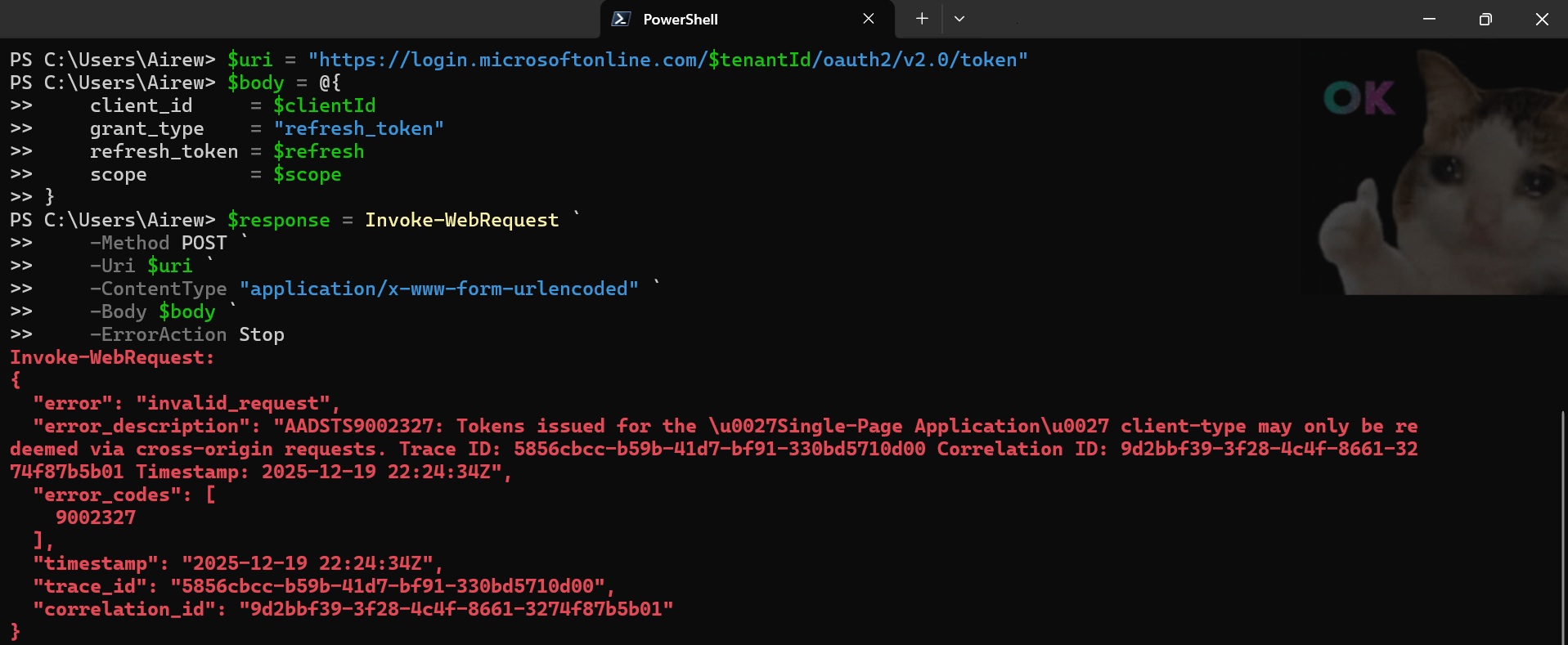
Conclusion
That’s a wrap ! – FOCI highlights how token portability can increase risk — understanding token types and where they are stored is a necessary first step before assessing real-world impact.
Part 2 builds on this foundation by showing how these tokens can be reused across FOCI-enabled applications, under which conditions this behavior can realistically be exploited, and how to mitigate it.