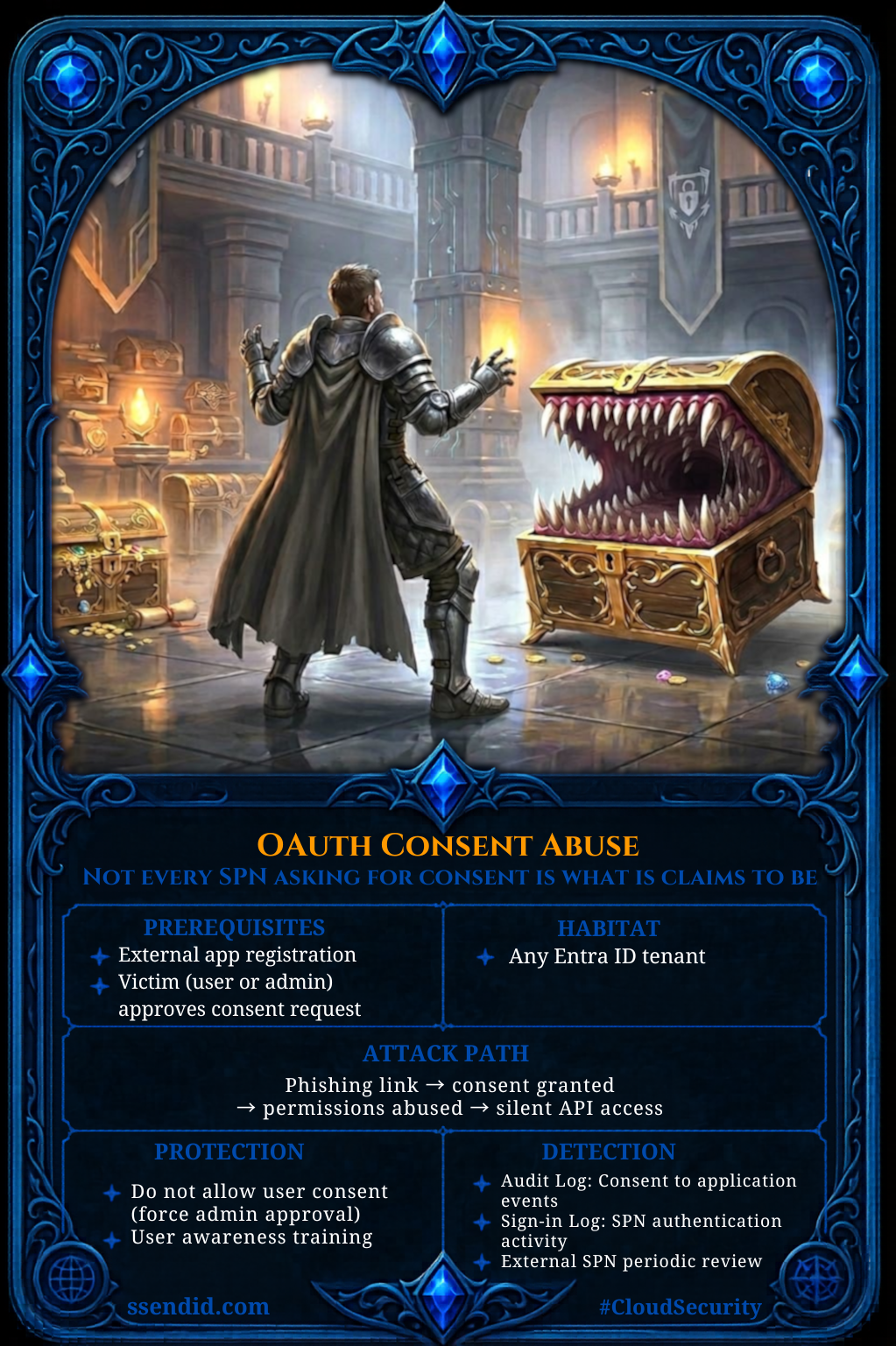
Abusing OAuth Permission Grants for Tenant Persistence
OAuth Permission Grants Abuse in Microsoft Entra ID - Attack Path Analysis and MITRE ATT&CK Mapping.
⚠️ Attention: This article focuses on cross-tenant OAuth consent abuse involving external applications accessing resources in the target tenant. Intra-tenant consent abuse scenarios are out of scope.
OAuth Consent Abuse in Microsoft Entra ID: Attack Paths, MITRE ATT&CK Mapping, and Detection Gaps
1. Introduction
OAuth permission grants in Microsoft Entra ID can survive password resets and MFA enforcement, making them a durable persistence mechanism that operates largely outside traditional detection models. Attackers increasingly target application consent mechanisms to establish this foothold, bypassing credential-based controls entirely.
These applications are represented in Entra ID by application objects and their associated service principals (Enterprise Applications) and can be granted OAuth permissions, including access to APIs such as Microsoft Graph.
2. OAuth Grants as a Security Boundary
Before examining how Entra ID applications can be abused, let’s first look at how permissions are granted to applications. Entra ID supports two types of permissions that can be granted to applications:
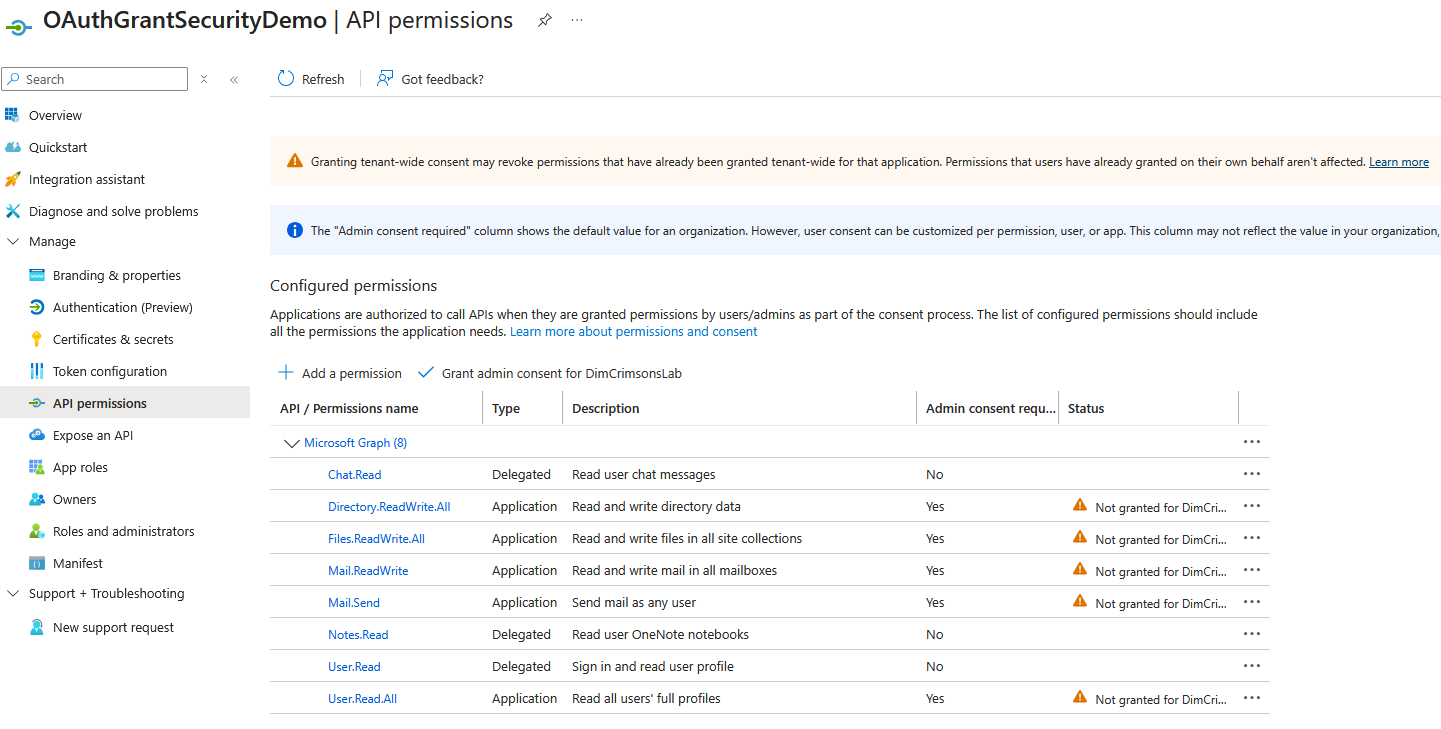
- Delegated: application acts on behalf of a signed-in user with privileges constrained by the user’s permissions and the granted scopes. These are a common target for consent phishing, as users can be tricked into approving the permissions.
- Application: application acts as itself with no user context. Admin consent is always required for these permissions as they’re scoped to the whole tenant.
A permission grant defines what an application is authorized to access within the tenant and across its resource APIs. Permissions are approved through the consent process, either by a user or an administrator.
These grants are subject to consent policies, which by default rely on Microsoft-managed settings.

Once consent is granted, the application requests OAuth tokens to access the approved APIs. For delegated permissions this occurs through user-based OAuth flows that produce refresh tokens. For application permissions, the client authenticates as itself, using a client secret, certificate, or federated credential, and mints tokens directly without user context.
Because these permission grants allow applications to obtain tokens and access APIs programmatically, abusing them can provide attackers with durable access to tenant resources. This makes permission grants a critical security boundary in Entra ID.
3. Consent-Driven Attack Flows
Two primary attack paths exploit OAuth consent to gain persistent access: delegated permissions (user consent) and application permissions (admin consent). Both ultimately result in the issuance of OAuth tokens that can be used to interact with tenant resources, either in a user context or application context.
3.1 Delegated Permissions - User Consent Abuse
Delegated permissions require the presence of an authenticated user and are granted through an interactive OAuth 2.0 authorization flow. In this process, the client application requests access to specific scopes, which the user must explicitly consent to before the application can act on their behalf.
Permissions that only require the user’s consent are listed with the AdminConsentRequired set to ‘No’ with, on the default Entra ID configuration, the exclusion of some permissions through a consent policy managed by Microsoft. Microsoft documentation does not always enumerate all permissions included or excluded under these policies. Full visibility therefore requires exploring the PermissionGrantPolicies object via CLI.
The linked PowerShell script retrieves the policies applied in the tenant and the permissions they govern.
Keep in mind this list is subject to updates on Microsoft’s side, so the script must be periodically re-run.
A list of Microsoft Graph delegated permissions can be extrapolated from the official Microsoft documentation.
The scenario demonstrated in this article relies on the OAuth 2.0 authorization code grant, in a two-tenant setup:
- Source Tenant: The tenant hosting the application registration, representing an attacker-controlled environment.
- Target Tenant: The tenant where the targeted user identities reside, along with the resources and data accessible to those users.
All resources and configurations demonstrated in this article were created in a controlled testing environment for research purposes only. They are intentionally non-realistic, as clearly indicated by their naming conventions and redirect URIs, and are not designed to replicate or be used in real-world phishing scenarios.
The attack starts with an App Registration in the source tenant configured for multi-tenant use (signInAudience: AzureADMultipleOrgs), with a redirect URI pointing to an attacker-controlled endpoint that will handle the OAuth callback and retrieve user tokens:
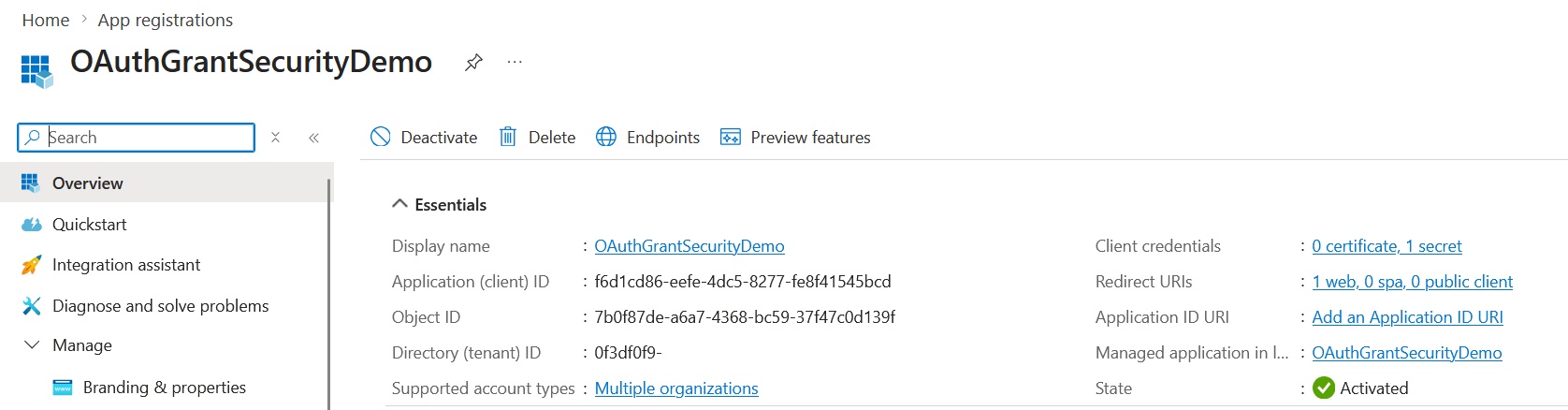
⚠️ Attention: End users cannot grant consent to newly registered multi-tenant applications unless the publisher is verified, a restriction enforced by default since 2020. Note that this restriction applies to user consent flows only, admin consent via the /adminconsent endpoint bypasses this check entirely.
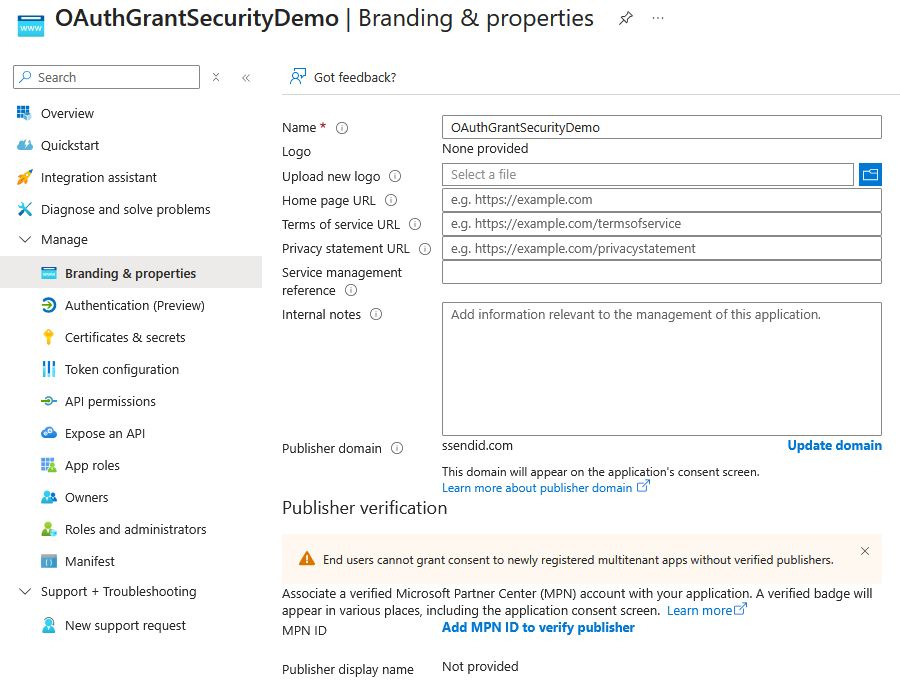
Verifying an application requires having a custom domain (default onmicrosoft.com domains are not supported) and a Microsoft Partner Center (MPN) account associated with the application.
The redirectUriSettings parameter will point to a compute resource that will host the OAuth flow logic to inspect and retrieve the user’s tokens.
1
2
3
4
5
6
7
8
9
10
11
12
13
14
15
16
17
18
 "signInAudience": "AzureADMultipleOrgs"
 "web": {
      "homePageUrl": null,
      "implicitGrantSettings": {
        "enableAccessTokenIssuance": false,
        "enableIdTokenIssuance": false
      },
      "logoutUrl": null,
      "redirectUriSettings": [
        {
          "index": null,
          "uri": "https://oauthgrantdemo-gqh0e7c7feh7evdt.northeurope-01.azurewebsites.net/callback"
        }
      ],
      "redirectUris": [
        "https://oauthgrantdemo-gqh0e7c7feh7evdt.northeurope-01.azurewebsites.net/callback"
      ]
    }
The demo uses a simple Azure Web App: a landing page that constructs the authorization URL, and a /callback endpoint that receives the authorization code and exchanges it for tokens at the /token endpoint.
3.1.1 Authorization Request Construction: Breaking Down the Delegated Permissions URL
The first step is redirecting the targeted user to the authorization endpoint to initiate the Authorization Code flow:
1
2
3
4
5
6
7
8
    https://login.microsoftonline.com/organizations/oauth2/v2.0/authorize?
    client_id=f6d1cd86-...
    &response_type=code
    &redirect_uri=...
    &response_mode=query
    &scope=openid%20profile%20email%20offline_access%20User.Read
    &state=...
    &prompt=consent
Standard parameters (client_id, response_type, redirect_uri, response_mode, state) are documented in Microsoft’s authorization code flow reference. From an attack perspective, two parameters are critical:
scope- Mandatory: The permissions requested by the application which includes:- OpenID scopes (
openid,profile,email) for authentication-related claims offline_accessallows the application to obtain a refresh token, enabling it to request new access tokens without further user interaction, effectively extending access beyond the user’s presence.- API scopes (e.g.,
User.Read) for delegated access to resources. These scopes are exposed by resource applications (such as Microsoft Graph or Azure services) and, by default (unless restricted by consent policies), can be granted through user consent..defaultis a special scope value that instructs the authorization server to issue a token containing all permissions for the targeted resource that have already been consented to. If no prior consent exists, it triggers a consent prompt for all configured delegated permissions for that resource.
- OpenID scopes (
prompt: Controls user interaction behavior. For example:consentforces the consent prompt to appear. Other values can influence whether the user is re-authenticated or forced to re-consent
⚠️ Attention If consent has not been previously granted, using prompt=none will cause the request to fail.
3.1.2 User Authentication and Consent Grant in Microsoft Entra ID
The user completes authentication and is prompted to grant consent for the application: 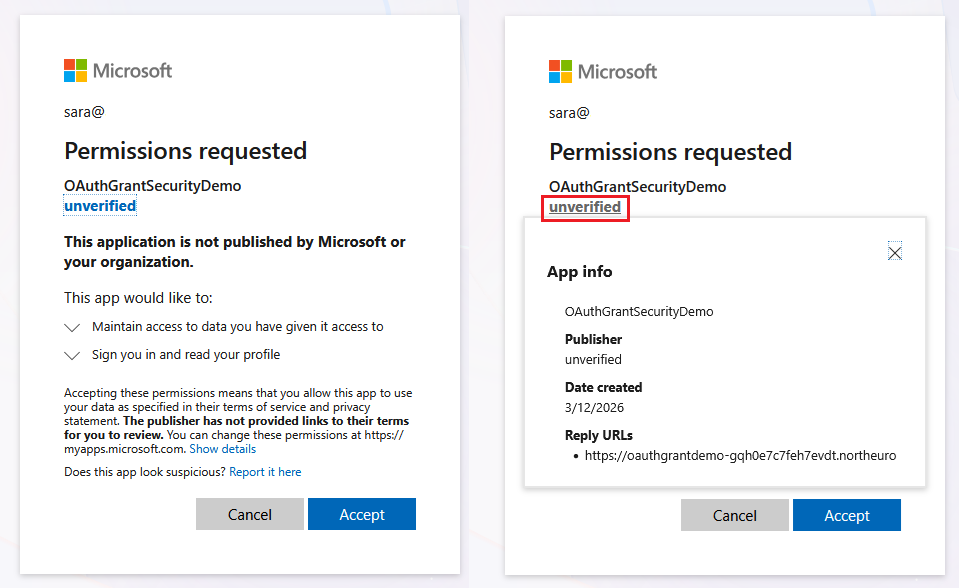 Behind the scenes, this sends the authorization code back to the endpoint specified in the redirect URI.
3.1.3 Authorization Code Redemption and Token Acquisition
The callback endpoint receives the authorization code and calls the /token endpoint. Because offline_access was requested, the response includes a refresh token, enabling the application to maintain access by requesting new access tokens without further user interaction.
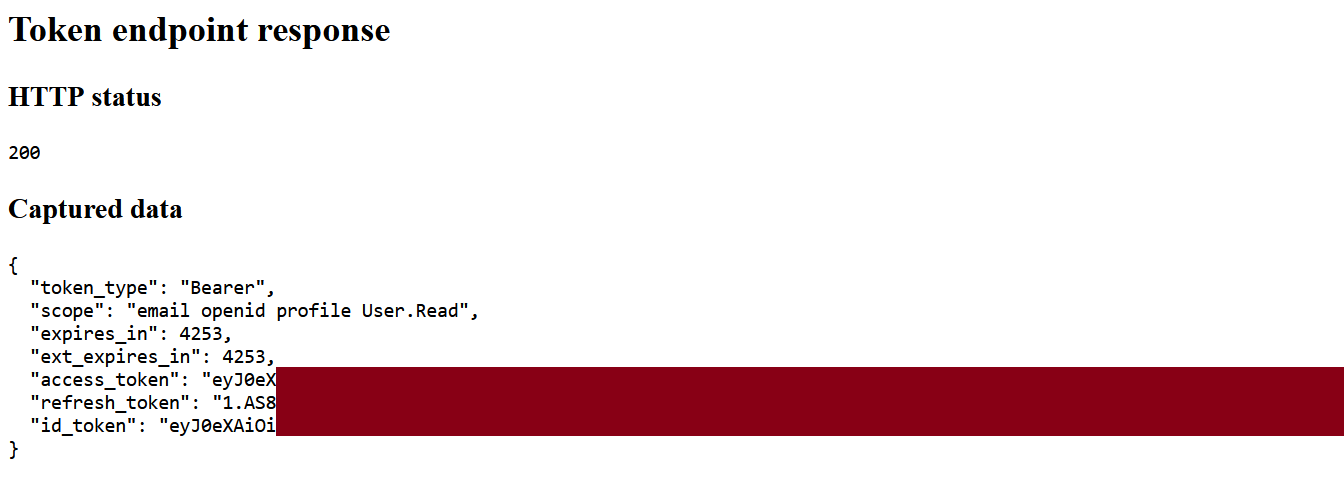
The user consent grant is materialized in Entra ID as an OAuth2PermissionGrant object tied to the user’s principalId:

In this multi-tenant scenario, this models trust externalization: the resource tenant accepts delegated access for an application registered in an external tenant, creating a powerful cross-boundary attack vector.
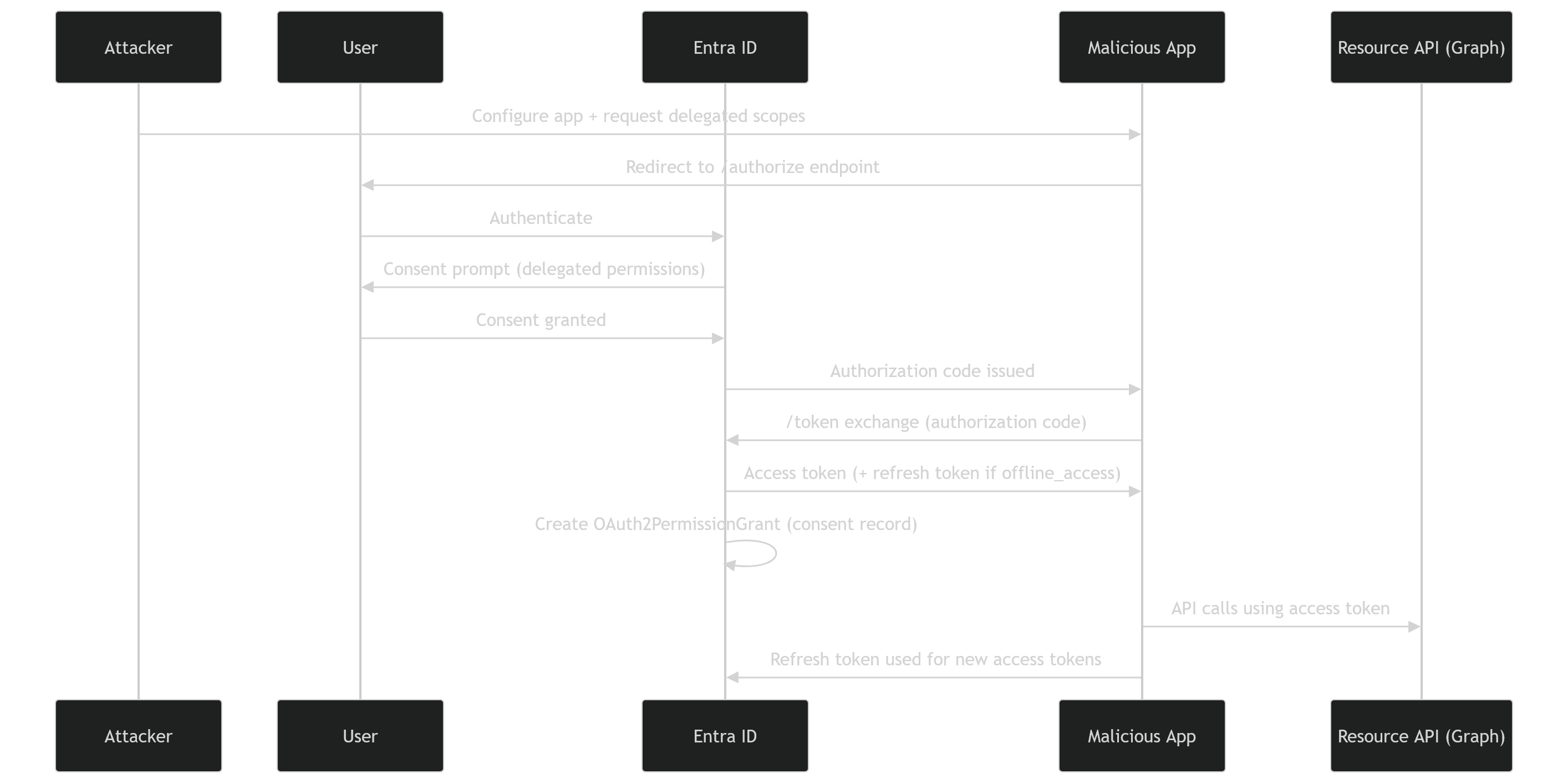
3.2 Application Permissions - Admin Consent Abuse
Application permissions must be consented by an administrator, which reduces the set of identities that can approve the consent. In contrast, the impact of such consent is higher as the permissions are more important and can be scoped to the whole tenant.
Administrator consent is triggered through the /adminconsent endpoint:
1
2
3
4
https://login.microsoftonline.com/common/adminconsent?
client_id=f6d1cd86-...
&redirect_uri=...
&state=...
Contrary to the user consent grant, the scope parameter is not required as the request is evaluated against the application’s pre-configured application permissions.
The admin grant does not return tokens. It creates an AppRoleAssignment artifact linked to the Service Principal:
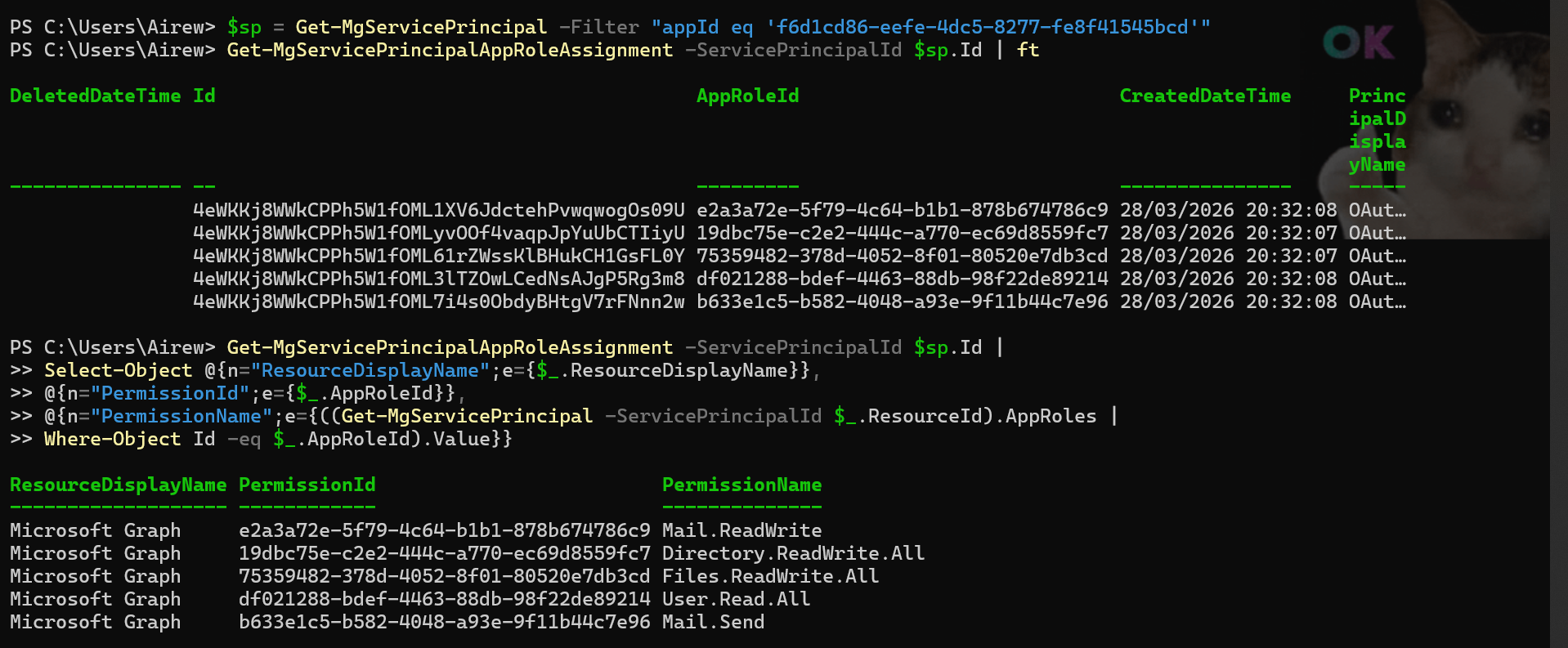
From this point, the attacker’s application can authenticate using its own credentials and request access tokens from the /token endpoint at will, achieving autonomous persistence.
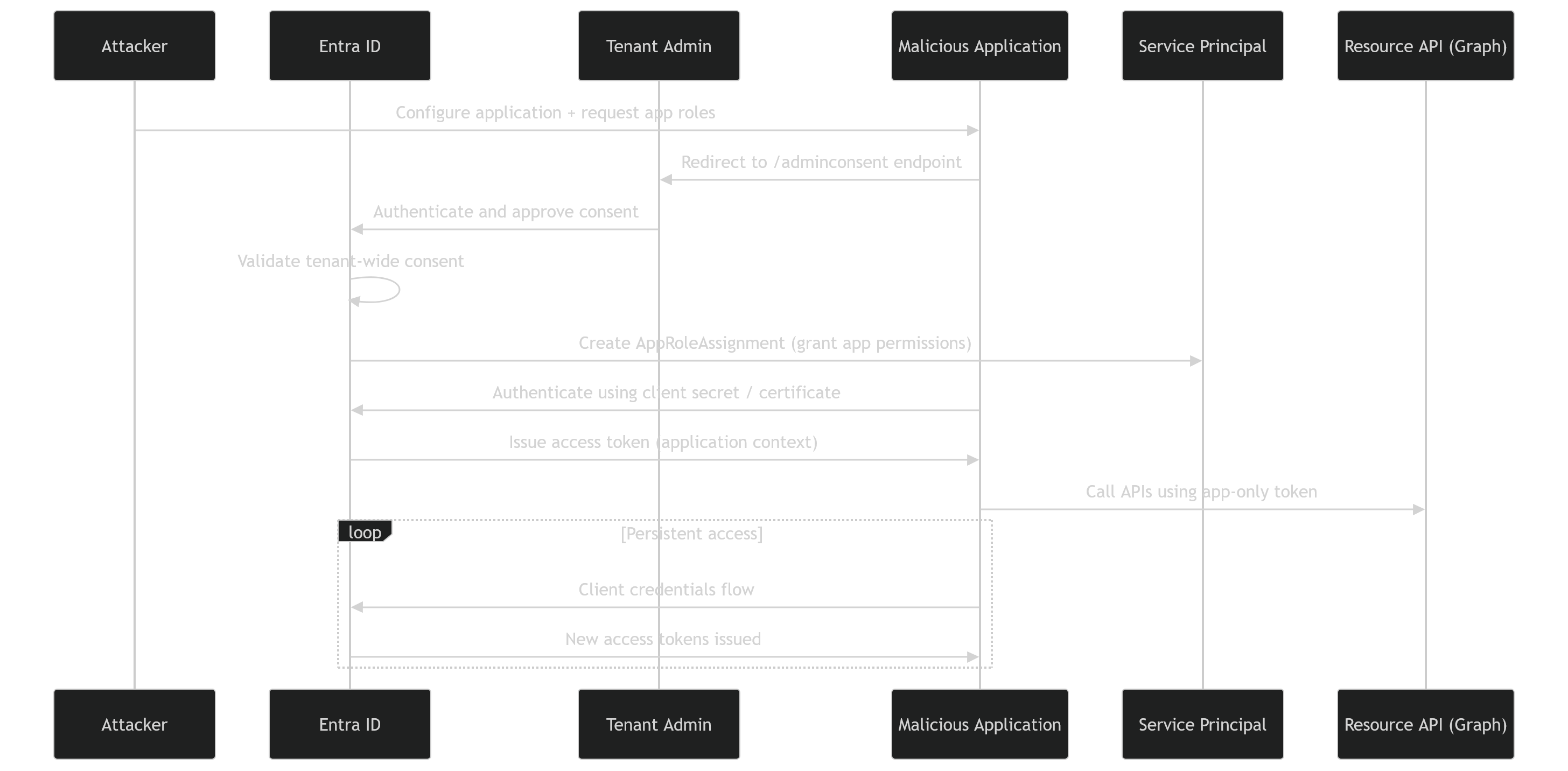
At this stage, we have seen how permissions can be granted. The next step is to distinguish how these grants differ from another major class of identity attacks: service principal compromise.
4. OAuth / Consent Abuse vs Service Principal Abuse
OAuth consent abuse and service principal compromise are frequently confused. The distinction matters because the artifacts, detection surface, and revocation paths are fundamentally different:
| Dimension | OAuth / Consent Abuse | Service Principal Abuse |
|---|---|---|
| Trigger | Consent flow (user or admin) | Credential compromise |
| Persistence Anchor | OAuth2PermissionGrant or AppRoleAssignment | Secret or certificate |
| Token Acquisition | Via refresh token (delegated) or client credentials (application) | Client credentials with stolen secret or certificate |
| Visibility | AuditLogs (consent events, app role assignements) | Sign-in logs (service principal sign-ins) |
| Detection Signal | Authorization change events, no authentication anomaly | Credential exposure, anomalous sign-in context |
| Revocation | Remove grant / revoke user sessions | Rotate credentials / disable SPN |
With OAuth consent abuse, the attacker’s objective shifts fundamentally from compromising identities to establishing trusted access paths that persist independently of credentials.
Revocation requires therefore identifying and removing the grant object itself.
5. Token Tradecraft
A common source of confusion in OAuth abuse analysis lies in the distinction between token replay and token generation capabilities. The three capabilities below represent increasing levels of persistence and attacker autonomy, and map directly to the two consent paths in §3.
Token replay refers to the reuse of an existing access token with no IdP interaction. Persistence is limited by the access token lifetime (~60–75 minutes). Moreover, tokens may be invalidated earlier than their lifetimes via Continuous Access Evaluation (CAE) in supported resource providers..
The attacker is borrowing access
Token renewal refers to the abuse of a compromised refresh token to continuously request new access tokens. This is not token replay, it’s a legitimate refresh token exchange at the /token endpoint. This introduces conditional persistence subject to Conditional Access policies, session revocation, and token lifetime controls.
The attacker is maintaining access
Token minting is where an attacker controlling a client secret, certificate or federated credential requests access tokens using the client credentials flow. This represents true autonomous persistence as long as the AppRoleAssignment exists and the credential is valid.
The attacker is owning the access pipeline
| Capability | Token Replay | Token Renewal (Delegated) | Token Minting (Application) |
|---|---|---|---|
| Mechanism | Reuse of existing token | Refresh token exchange | Credential-based token issuance |
| Persistence model | Stateless / token-bound | Session-bound / conditional | Identity-bound / autonomous |
| Dependency | Access token | Refresh token (revocable) | Client secret / certificate / federated credential |
| IdP Interaction | None | Required (/token endpoint) | Required (/token endpoint) |
| Revocation impact | High (token expiry or CAE) | Medium (session revocation / CA policies) | Variable (depends on credential rotation / SP disablement) |
| Detection | Token reuse patterns | Refresh activity correlation | Workload identity sign-ins |
Application permissions enable autonomous token minting via service principal credentials, whereas delegated permissions enable a conditional token minting capability via refresh tokens. In both cases, OAuth abuse is dangerous not because it grants access, but because it enables token issuance without re-authentication.
→ The true security boundary is not the protection of tokens themselves, but the control over the mechanisms that allow tokens to be continuously issued.
6. MITRE ATT&CK Mapping
The attack chain maps across four MITRE ATT&CK techniques. Note that the boundary between Initial Access and Persistence collapses here: A single user action simultaneously grants access and establishes long-term persistence.
Both delegated and application permission abuse share common ATT&CK techniques: 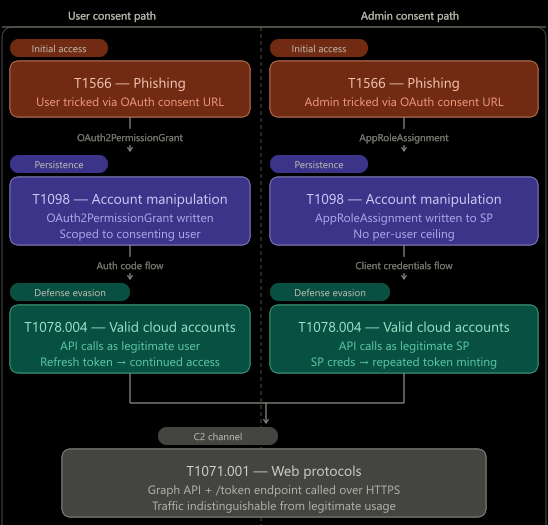
- Setup Optional -
Create Cloud Account (T1136.003): The attacker registers a new application in their tenant, introducing a new application identity (service principal) that will be used to receive consent grants. This step is optional if an existing application is repurposed. - Initial Access -
Phishing (T1566): A user or administrator is tricked into initiating consent flow. No credentials are harvested; the attacker targets consent decision, not secrets : This is consent phishing. - Persistence -
Account Manipulation (T1098): Consent creates persistent authorization artifacts directly in the target tenant’s identity control plane:- OAuth2PermissionGrant (delegated permissions)
- AppRoleAssignment (application permissions)
- Execution -
Valid Cloud Accounts (T1078.004): Post-consent access uses legitimate Microsoft Entra ID identities with granted trust and is performed using:- A legitimate user identity (delegated flow)
- A legitimate service principal (application flow)
- Exfiltration -
Application Layer Protocol: Web Protocols (T1071.001): The attacker queries an API (e.g. Microsoft Graph) over HTTPS using valid tokens. Traffic is indistinguishable from legitimate application API usage.
By analyzing this attack chain, we notice that the OAuth Consent Abuse does not rely on breaking security controls, but on leveraging them as designed:
There’s no brute force, no anomalous authentication is required, no token needs to be stolen. Authentication, token issuance and API usage are all legitimate.
This explains why consent abuse frequently bypasses traditional monitoring approaches and remains under-detected in many environments.
7. Detection Gaps and Defensive Blind Spots
Detection signals for OAuth consent abuse are distributed across identity logs, directory objects, and service principal activity. These fragmented signals become more meaningful through correlation.
7.1 Telemetry Sources - The Observability Layer
7.1.1 Directory Objects
After a successful consent abuse attack, an Enterprise Application object and the subsequent Service Principal, is created in the target’s tenant.
A first indication is therefore the presence of suspicious multi-organization Service Principals backed by applications registered in external tenants, especially when they are not associated with known or trusted partners.
1
Get-MgServicePrincipal -Filter "DisplayName eq 'OAuthGrantAbuse'" | select AppDisplayName, AppId, AppOwnerOrganizationId, DisplayName, Id, ReplyUrls, ServicePrincipalType, SignInAudience, @{Name = "CreatedDateTime";Expression = { $_.AdditionalProperties["createdDateTime"]}}, @{Name = "PublisherName";Expression = { $_.VerifiedPublisher["DisplayName"]}},AccountEnabled, Homepage,Tags
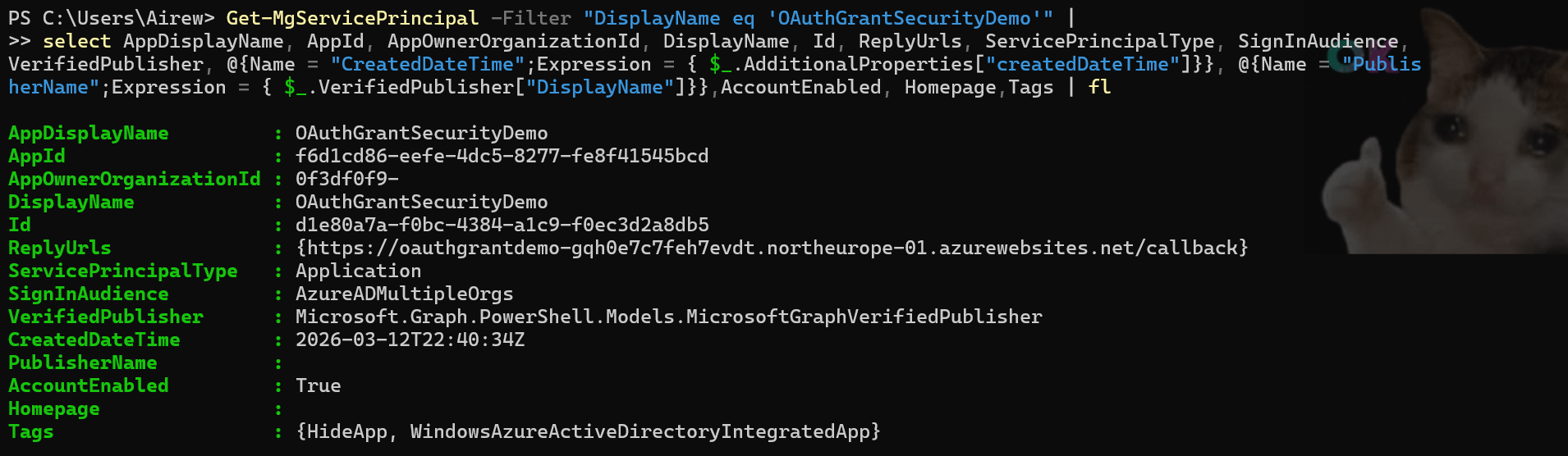
Key fields and their detection relevance:
AppOwnerOrganizationId: The ID of the tenant where the App Registration object resides; values pointing to external tenants should be reviewed carefully.SignInAudience: Accounts supported by the application; external or multi-tenant apps often have values not limited to the current organization (e.g. AzureADMultipleOrgs).VerifiedPublisher: A missing or unverified publisher represents a lower level of trust.CreatedDateTime: A recent creation, especially when aligned with consent or sign-in events, can be suspicious.ReplyUrls,Homepage: External URLs that could potentially be used for phishing or data exfiltration.AccountEnabled: Indicates active objects and potentially ongoing access.
An external application ownership (AppOwnerOrganizationId) combined with an unverified or unknown publisher could signal potential multi-tenant consent phishing.
7.1.2 Sign-in Logs
Sign-in events capture authentication activity when users interact with the application, providing visibility into user context, source (IP address, geolocation, device…), authentication method, Conditional Access evaluation, and the target resource for which tokens were issued.
Normalized Sign-in Logs:
1
2
3
4
5
6
7
8
9
10
11
12
13
14
15
16
17
18
19
20
21
22
23
24
25
26
27
28
29
30
31
32
33
34
35
36
37
38
39
40
41
42
43
44
45
46
47
48
49
50
51
52
53
54
55
56
[
  {
    "createdDateTime": "2026-03-28T20:31:23Z",
    "userPrincipalName": "sse@...",
    "userType": "Member",
    "appDisplayName": "OAuthGrantSecurityDemo",
    "resourceDisplayName": "Microsoft Entra ID",
    "status": {
      "errorCode": 65001,
      "failureReason": "Consent required"
    },
    "clientAppUsed": "Browser",
    "deviceDetail": {
      "browser": "Firefox 149.0",
      "operatingSystem": "Windows 10"
    },
    "location": {
      "ipAddress": "2001:861:3201:ebc0:9513:2664:3c3e:8d50",
      "countryOrRegion": "France"
    },
    "authenticationDetails": {
      "authenticationRequirement": "Multifactor authentication",
      "authenticationMethod": "Prompted"
    },
    "conditionalAccessStatus": "notApplied",
    "correlationId": "4b5812d8-bbb1-4d51-9197-d6d1315833ce",
    "resultType": "Interrupted"
  },
  {
    "createdDateTime": "2026-03-28T20:32:08Z",
    "userPrincipalName": "sse@...",
    "userType": "Member",
    "appDisplayName": "OAuthGrantSecurityDemo",
    "resourceDisplayName": "Microsoft Entra ID",
    "status": {
      "errorCode": 0,
      "failureReason": null
    },
    "clientAppUsed": "Browser",
    "deviceDetail": {
      "browser": "Firefox 149.0",
      "operatingSystem": "Windows 10"
    },
    "location": {
      "ipAddress": "2001:861:3201:ebc0:9513:2664:3c3e:8d50",
      "countryOrRegion": "France"
    },
    "authenticationDetails": {
      "authenticationRequirement": "Multifactor authentication",
      "authenticationMethod": "Satisfied"
    },
    "conditionalAccessStatus": "notApplied",
    "correlationId": "4b5812d8-bbb1-4d51-9197-d6d1315833ce",
    "resultType": "Success"
  }
]
A status Interrupted with error code 65001 (“Consent required”) indicates that authentication succeeded but token issuance was blocked because the application required user or administrator consent. A successful sign-in immediately after on the same correlationId means the user granted consent during that interaction. This sequence is a high-confidence consent phishing indicator.
7.1.3 Audit Logs
Audit logs provide insights on the consent events and indicate the scope (API permissions) requested and subsequently granted:
Normalized Audit Logs:
1
2
3
4
5
6
7
8
9
10
11
12
13
14
15
16
17
18
19
20
21
22
23
24
25
26
27
28
29
30
31
32
33
34
35
36
37
38
39
40
41
42
43
44
[
  {
    "activityDateTime": "2026-03-28T20:32:08Z",
    "activityDisplayName": "Consent to application",
    "result": "success",
    "correlationId": "1253aa1c-fd46-4e15-8a75-397d23cde2ce",
    "initiatedBy": {
      "user": {
        "userPrincipalName": "sse@...",
        "ipAddress": "20.240.136.183"
      }
    },
    "targetResources": [
      {
        "displayName": "OAuthGrantAbuse",
        "type": "ServicePrincipal"
      }
    ],
    "modifiedProperties": {
      "ConsentContext.IsAdminConsent": "True",
      "ConsentContext.OnBehalfOfAll": "True",
      "ConsentAction.Permissions": ["Chat.Read", "Notes.Read", "User.Read"]
    }
  },
  {
    "activityDateTime": "2026-03-28T20:32:08Z",
    "activityDisplayName": "Add app role assignment to service principal",
    "result": "success",
    "initiatedBy": {
      "user": {
        "userPrincipalName": "sse@..."
      }
    },
    "targetResources": [
      {
        "displayName": "Microsoft Graph",
        "type": "ServicePrincipal"
      }
    ],
    "modifiedProperties": {
      "AppRole.Value": "User.Read.All"
    }
  }
]
Two event types are relevant:
- Consent to application: Fires on user or admin consent. ConsentContext.OnBehalfOfAll: True indicates tenant-wide admin consent. ConsentAction.Permissions lists the exact scopes granted.
- Add app role assignment to service principal: Fires when an AppRoleAssignment (application permission) is created.
7.2 Detection Logic - A Hunter’s Playbook
The detection logic is built in three layers, each adding signal on top of the previous one.
7.2.1 Enumerating service principals and permissions
The tool will be based on an inventory of the tenant’s service principals where AppOwnerOrganizationId differs from the current or organization’s tenant IDs, as the detection primary signal.
Supporting signals to enrich each entry, include: the verifiedPublisher property to flag unverified publishers, and permission grant objects OAuth2PermissionGrant and AppRoleAssignment to expose the scope of granted access.
Moreover, application permissions (ConsentType = AllPrincipals) should be prioritized as they grant tenant-wide access with no per-user scope constraint.
This layer produces a static risk inventory at a point in time.
7.2.2 Correlating consent events with identity object creation
To move towards continuous monitoring, it is necessary to track consent-related events such as “Consent to application” and “Add app role assignment”.
Additionally, temporal correlation between service principal creation and consent events must also be observed to reconstruct the identity provisioning chain. This enables the identification of anomalous lifecycle patterns where the provisioning and authorization occur in rapid succession, indicating potential OAuth consent abuse scenarios.
📦 Detection Tool: The KQL queries implementing these detection layers are available in the GitHub ConsentPhishing KQL folder, covering the consent phishing sign-in correlation and post-consent service principal activity monitoring.
7.2.3 Monitoring service principal activity
Continuous monitoring focuses on post-consent activity of service principals. This includes:
- Unexpected or expanded API usage beyond previously observed patterns;
- Access to high-value resources aligned with granted permissions;
- Deviations in access context such as geography or network origin;
This layer completes the lifecycle analysis by identifying cases where applications exhibit behavior consistent with potential OAuth consent abuse, including active data exfiltration.
📦 Detection Tool: I’ve released a Python-based detection tool that enumerates external service principals, analyzes their OAuth permission grants and app roles, correlates sign-in activity, and outputs prioritized risk cards.
8 Mitigation and Hardening Controls
⚠️ Attention: Conditional Access for workload identities is not a universal safety net. It can cover eligible single-tenant service principals, but not the multi-tenant external applications used in this attack path. For those, consent governance and monitoring remain the main controls.
8.1 Preventive Controls (pre-consent)
User Consent Restrictions: User consent policies must be configured to limit the ability of users to grant permissions to applications.
By default, user consent settings follow Microsoft-managed policies. If the organization has stricter security requirements, the option Do not allow user consent would reduce exposure to consent phishing scenarios as admin consent would be required for all apps. Alternatively, for organizations requiring more flexibility, Allow user consent for apps from verified publishers, for selected permissions would allow users to grant consent for an allowed scope defined by the admins (Low Permissions). This requires a careful governance approach to permissions classified as Low as these permissions define the exposure surface that do not require admin approval.
For admin consent, a review workflow is designated where reviewers can assess requests before approval; however, final consent remains restricted to administrators.
8.2 Governance Controls (periodic reviews)
Service Principal Governance: Overall, an organization must maintain ownership and a lifecycle management process covering creation, review of active principals and removal of unused or orphan identities:
- Periodic reviews of
OAuth2PermissionGrant(delegated permissions) andAppRoleAssignment(application permissions) objects. - Flagging and reviewing applications without a
verifiedPublisher.
8.3 Reactive Controls (post-detection)
Reactive controls focus on containment and remediation once suspicious applications are identified:
- Revoke the unnecessary or high-risk grants and remove the
OAuth2PermissionGrantorAppRoleAssignmentartifacts; - Disable or delete the service principal and associated application;
- Revoke any user session in delegated scenarios to prevent continued access;
In confirmed malicious use cases, the service principal object, and all associated artifacts must be removed.
9. Conclusion
That’s a wrap ! — OAuth consent abuse is an identity control-plane risk where the persistence anchor is an authorization artifact. Effective defense requires pre-consent controls to restrict the attack surface, continuous inventory of external application grants, and detection logic that correlates consent events with identity lifecycle and post-consent activity.